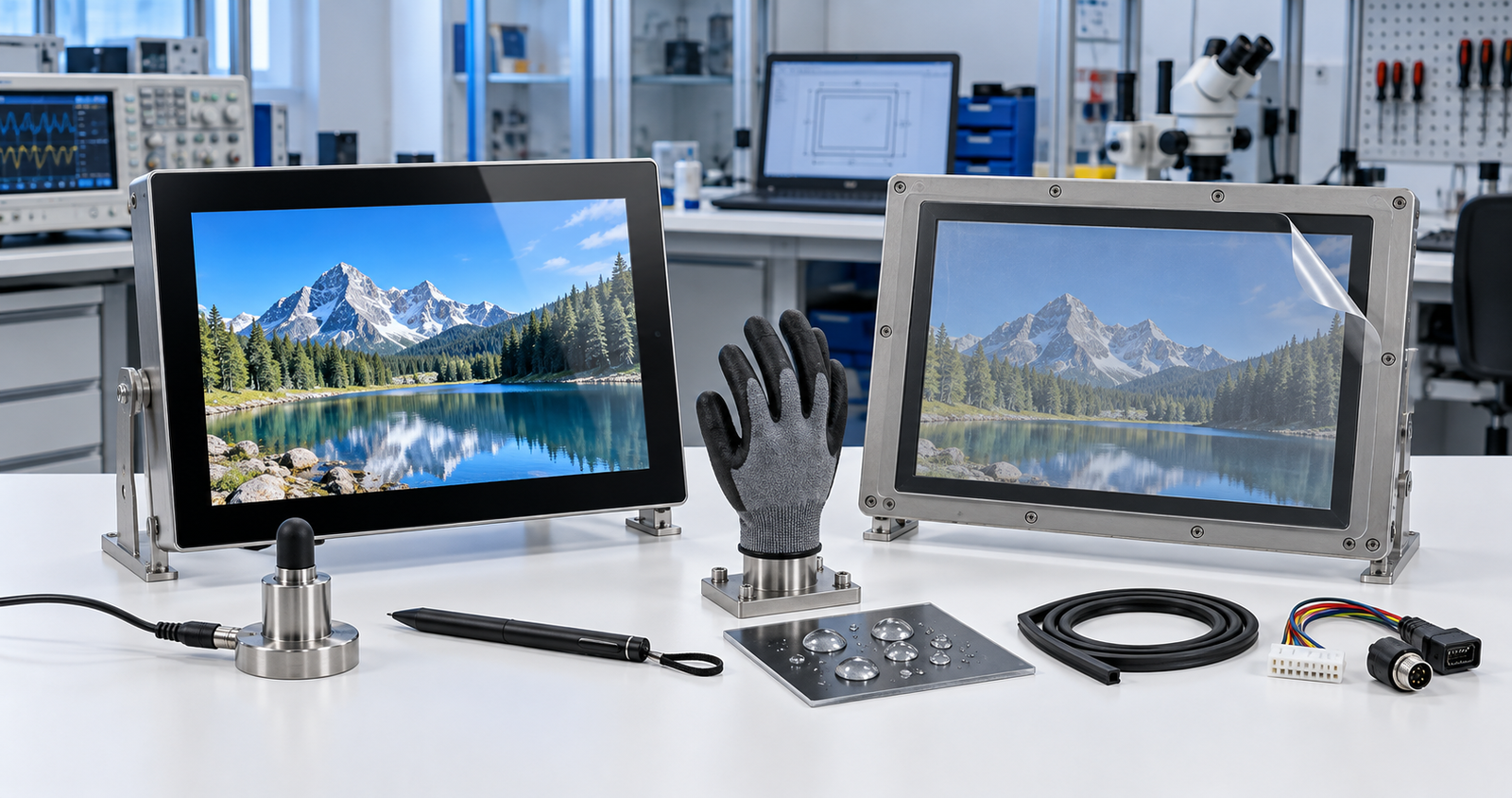
Capacitive touch is usually better for modern finger-operated interfaces, multi-touch gestures, a smooth glass front, and public-facing products. Resistive touch is often better when the operator must use thick gloves, a simple passive stylus, or deliberate pressure-based single-point input.** Neither technology is universally superior. The right choice depends on who will operate the screen, what will touch it, the surrounding environment, the user interface, and the complete display construction.
For most retail kiosks, POS terminals, smart devices, and gesture-led controls, projected capacitive touch, or PCAP, is the practical starting point. For selected industrial machines, laboratory equipment, legacy controls, and glove- or stylus-led workflows, resistive touch can remain the more reliable and economical engineering choice.
Capacitive vs. Resistive Touch Screen: Quick Comparison
| Decision factor | Projected capacitive touch (PCAP) | Resistive touch |
|---|---|---|
| Sensing method | Measures changes in an electric field across an electrode grid | Detects the position where two conductive layers meet under pressure |
| Normal input | Bare finger or compatible conductive stylus | Finger, many gloves, or a blunt passive stylus |
| Activation | Light contact | Physical pressure |
| Multi-touch | Common on compatible controllers and operating systems | Normally single-point; specialized multi-touch designs exist |
| Gesture-oriented interface | Strong fit | Limited on conventional systems |
| Fine point selection | Good with suitable target sizes; pen features require a compatible solution | Strong fit for deliberate point input with a suitable stylus |
| Gloves | Possible with compatible gloves, controller settings, and validation | Works with many glove types because input is pressure-based |
| Water and contaminants | Requires water rejection, firmware tuning, interface design, and testing | Pressure input can remain useful around moisture, but sealing and false-operation risks still need testing |
| Front surface | Commonly uses a rigid cover-glass construction | Conventional designs require a flexible top layer |
| Optical appearance | Often selected for a clear, flush glass-front design | Additional flexible layers can affect appearance; performance varies by construction |
| Surface wear | Glass can resist routine surface wear but can still chip or break | Flexible surface can scratch, crease, or wear; construction and use conditions matter |
| Electrical integration | Sensitive to sensor design, grounding, display noise, glass stack, and controller tuning | Requires matched sensor, controller or ADC, calibration strategy, and noise control |
| Typical applications | Kiosks, POS, commercial monitors, consumer-style interfaces, modern HMIs | Industrial controls, gloved operation, passive-stylus input, simple single-point HMIs |
The table describes common commercial implementations, not guarantees for every product. Sensor construction, controller firmware, cover material, bonding, enclosure, host software, and environmental conditions can change the result.
How Does a Capacitive Touch Screen Work?
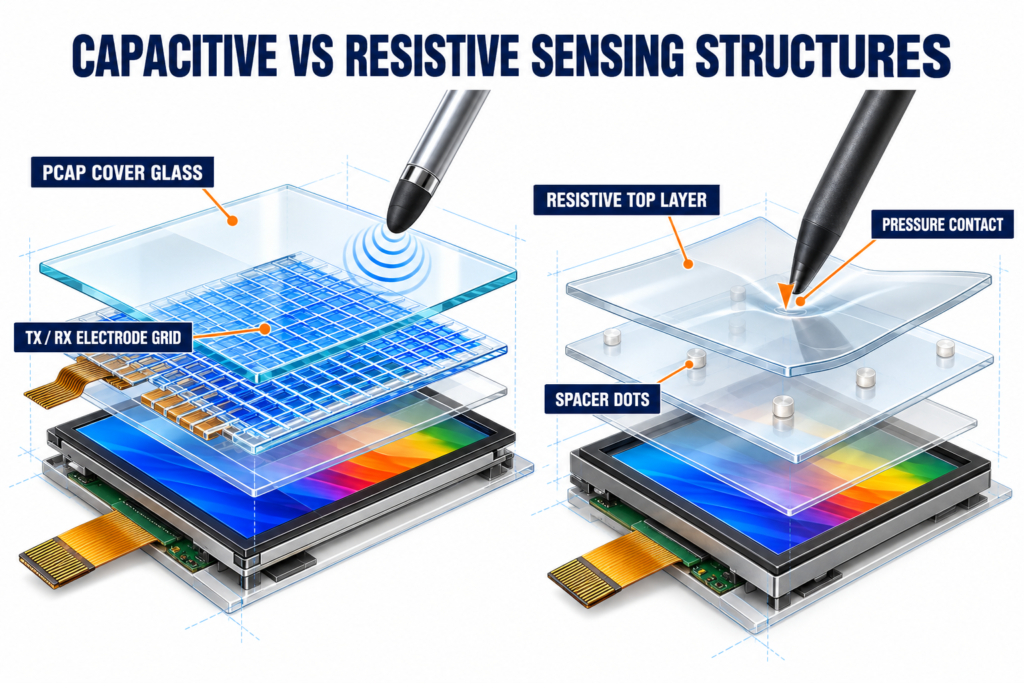
The comparison normally refers to projected capacitive touch, not the simpler surface-capacitive technology found in some older systems. A PCAP sensor contains transparent conductive electrodes arranged in a pattern beneath a cover surface. The controller scans the electrodes and measures changes relative to an established no-touch baseline. A finger or compatible conductive object changes the local capacitive field, allowing the controller to calculate one or more touch coordinates.
Microchip’s projected-capacitive sensing guide explains that capacitance depends on sensor design, integration, controller design, and the touch itself. This is why PCAP performance cannot be judged from the label “capacitive” alone. Electrode geometry, cover-glass thickness, adhesive, grounding, LCD noise, bezel design, firmware, and the user’s input method all influence the finished system.
PCAP is often chosen because it supports light finger input, multi-touch, gestures, and a rigid glass front. The same sensing method also means that gloves, water, thick glass, and electrical noise must be considered during controller selection and sample tuning.
For a deeper explanation of the complete signal chain, see how a touchscreen works and how the touch screen controller turns a sensor change into coordinates for the host system.
How Does a Resistive Touch Screen Work?
A conventional resistive sensor uses two transparent conductive layers separated by a small gap and spacer structure. Pressing the flexible upper layer makes the two conductive surfaces contact. The controller applies voltage across the layers and measures the resulting position on the X and Y axes.
Analog Devices’ explanation of resistive sensing describes this pressure contact and voltage-divider method. Traditional four-wire and five-wire systems are commonly used for single-point input. Specialized dual-touch or multi-touch resistive designs exist, so “resistive always means one touch” is not technically absolute. However, conventional resistive touch should not be selected when the software depends on routine phone-like multi-finger gestures unless the exact sensor and controller explicitly support them.
Because activation depends on pressure rather than body capacitance, a resistive screen can accept input from many gloves and blunt nonconductive styluses. Its flexible operating surface is also an important mechanical constraint. Sharp tools, repeated abrasion, chemicals, and cleaning methods must be evaluated with the actual overlay.
Which Touch Screen Gives the Better User Experience?
Finger Input and Gestures
PCAP usually provides the more familiar experience for users who expect light taps, swipes, pinch-to-zoom, rotation, and several simultaneous contacts. It is well suited to interfaces designed around finger-sized targets and direct manipulation.
Resistive touch requires enough force to bring the conductive layers together. This can feel deliberate rather than fluid, which may be beneficial for a machine control where accidental brushing should not trigger a command. It is less suitable for interfaces that assume effortless multi-finger gestures.
The application must also support the advertised touch-point count. A ten-point PCAP controller does not guarantee that the operating system, driver, or application will interpret ten independent contacts.
Stylus and Precise Selection
Resistive touch is often the simpler choice for precise single-point selection with a basic passive stylus. The screen responds to the pressure point rather than requiring a conductive tip or dedicated pen protocol. This can suit compact buttons, signatures with modest requirements, handwriting entry, and legacy industrial applications.
Standard PCAP can work with a compatible passive capacitive stylus, but that stylus normally behaves like a finger. Pressure sensitivity, hover, palm rejection, tilt, side buttons, and high-quality handwriting require a matched active-pen or digitizer system. Those features should not be inferred from “capacitive” or “multi-touch.”
See the detailed touchscreen stylus compatibility guide when pen input is a primary requirement.
Interface Design
Touch technology cannot rescue an unsuitable interface. A glove-operated HMI needs larger controls than a bare-finger consumer interface. A resistive stylus workflow may support smaller targets, but the operator must still read labels clearly and confirm actions safely. Critical machine-stop and safety functions may require dedicated physical controls rather than touch-only operation.
Which Is Better for Gloves, Water, and Dirty Environments?
Gloves
Resistive touch is the lower-risk starting point when operators use varied thick gloves and the interface only needs deliberate single-point input. The glove does not need to conduct electricity; it only needs to transmit sufficient pressure without damaging the surface.
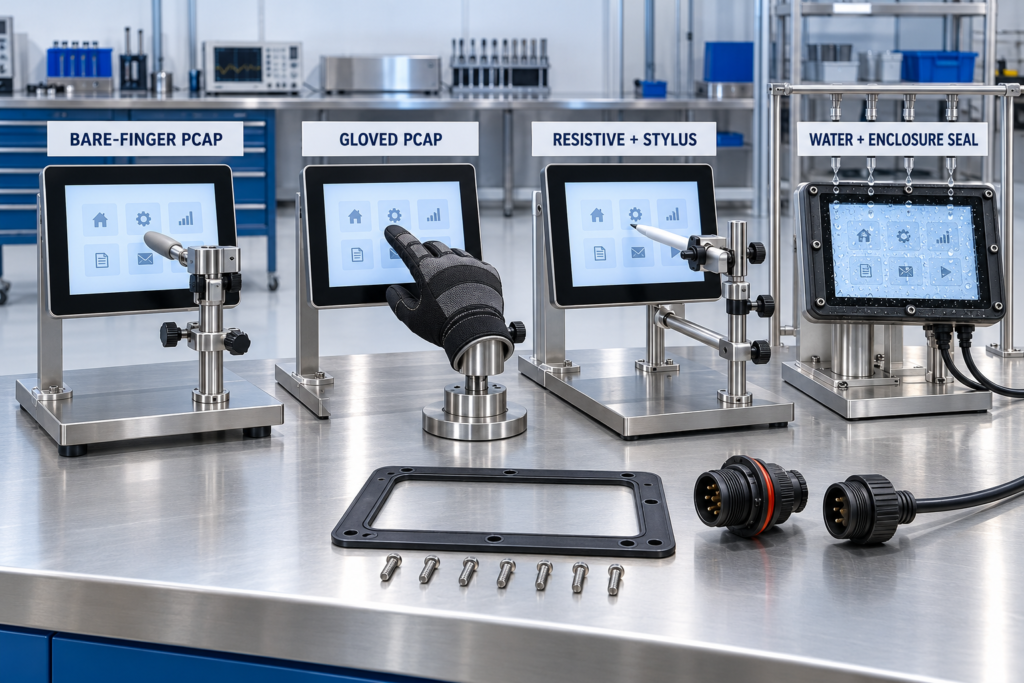
PCAP can work with selected gloves, but success depends on glove material and thickness, sensor sensitivity, cover-glass stack, grounding, controller capability, and firmware. A “glove mode” specification is not a substitute for testing the actual dry and wet gloves used at the site.
Water and Cleaning
Water can alter the electric field of a capacitive screen, producing false touches, blocked input, or intentional temporary lockout. Tuned PCAP systems can provide droplet rejection or controlled wet operation, but “waterproof” and “works while wet” are different requirements.
Resistive technology can remain responsive to deliberate pressure in the presence of moisture because it does not rely on a finger’s capacitive effect. That does not mean every resistive monitor is waterproof or immune to contaminants. Water can still enter through edges, damage electronics, collect under a bezel, or create unsafe operating conditions.
SCHURTER’s touchscreen guidance makes this distinction clear: PCAP water behavior depends on programming and may disable touch when a large amount of water is detected, while resistive technology can continue to use pressure input around moisture. In both cases, the complete enclosure, gasket, connectors, drainage, cleaning procedure, and required IP protection remain separate engineering decisions.
Oils, Dust, and Conductive Contamination
Contamination should be reproduced during sample testing. PCAP may need tuning to distinguish a deliberate finger from conductive liquid, palms, or objects resting on the glass. A resistive screen may be less affected electrically, but deposits can increase activation force, obscure the display, abrade the surface, or interfere with bezel movement.
For washdown, outdoor, and exposed-equipment projects, compare both technologies within the complete waterproof touch screen structure rather than selecting the sensor independently.
Which Touch Screen Is More Durable?
There is no responsible one-word answer because the failure modes differ.
PCAP Durability
A rigid cover-glass front can resist routine finger wear and support a flush, easy-to-clean surface. Glass thickness, tempering, edge treatment, mounting stress, bonding, and impact exposure affect the result. Glass can scratch under abrasive contamination and can chip or break under sufficient impact. Replacing the cover stack may also require sensor or controller retuning.
Resistive Durability
The flexible top layer experiences mechanical movement during every activation. Its lifetime depends on material, wire architecture, actuation force, point loading, temperature, chemicals, stylus shape, and cleaning. A blunt approved stylus can be suitable; a sharp tip can concentrate force and damage the overlay.
Do not compare durability from technology names alone. Request model-level information about surface material, impact protection, chemical compatibility, approved cleaning method, environmental limits, and the supplier’s test method. Then reproduce the actual contact tool and operating conditions during validation.
Optical Quality and Front-Surface Design
PCAP is commonly selected when the product needs a flat glass front, modern appearance, and high perceived image clarity. The sensor and optical stack still introduce reflections and transmission losses. Anti-glare, anti-reflection, anti-fingerprint coatings, optical bonding, brightness, and ambient light may matter more than the touch label.
Conventional resistive construction adds flexible conductive layers and an air gap or spacer structure. This can affect contrast, reflections, and image appearance compared with a well-designed glass-front PCAP stack. The actual difference varies, so compare approved samples at the required brightness and viewing angle instead of relying on generic transmission percentages.
A flush front also changes mechanical integration. It may simplify cleaning and branding, but the cover glass, printed border, adhesive, sensor, grounding, and enclosure must be designed together.
Electrical Noise, Grounding, and Controller Integration
PCAP measures very small electrical changes. Display electronics, power supplies, chargers, motors, radio transmitters, grounding, metal bezels, long cables, and thick cover glass can reduce the signal margin or create false input. Controller matching and firmware tuning are therefore part of the display design, not optional finishing work.
Resistive systems use a controller or ADC to drive and measure the sensor layers. They still need stable power, suitable filtering, correct PCB layout, calibration, ESD protection, and a compatible host interface. Four-wire, five-wire, eight-wire, and specialized resistive structures should not be treated as electrically interchangeable.
For both technologies, confirm:
- Exact sensor and controller combination
- USB, serial, I2C, SPI, or other host interface
- Operating-system and driver support
- Video and touch cable routing
- Grounding and shielding method
- Orientation and coordinate mapping
- Wake, sleep, reconnect, and power-cycle behavior
- Controller firmware ownership and change control
Lucky-XFC’s scope is controller matching and display integration rather than bare controller-IC fabrication. The sensor, controller, cover structure, display electronics, host interface, and enclosure should be validated as one system.
Is Capacitive Touch More Expensive Than Resistive Touch?
PCAP often carries a higher initial component and engineering cost than a basic conventional resistive solution of similar size, especially when it needs custom cover glass, bonding, water rejection, glove support, or noise tuning. That is a general tendency, not a quotation rule. Panel size, volume, controller, glass, optical treatment, mounting, certifications, and availability can reverse a simple comparison.
Compare total ownership cost rather than sensor price alone:
| Cost item | Questions for PCAP | Questions for resistive touch |
|---|---|---|
| Sensor and controller | Is the controller matched and firmware included? | Which wire architecture and controller are included? |
| Mechanical stack | Are cover glass, printing, bonding, and enclosure changes included? | Are overlay, bezel clearance, sealing, and approved stylus included? |
| Engineering | Does the quote include tuning for glass, gloves, water, noise, and orientation? | Does it include calibration, filtering, coordinate mapping, and host setup? |
| Software | Is the required multi-touch HID or driver supported? | Is a driver or calibration utility required for the target OS? |
| Validation | Are actual gloves, water, stylus, EMI sources, and temperature tested? | Are actuation force, stylus, wear, calibration, and contamination tested? |
| Maintenance | Can the glass/sensor assembly be replaced and retuned? | Can the overlay or touch assembly be replaced and recalibrated? |
A lower purchase price can become more expensive if it forces an interface redesign, requires frequent recalibration, fails with the real gloves, or cannot be replaced through the product lifecycle.
Best Technology by Application
| Application | Better starting point | Why | Validate before ordering |
|---|---|---|---|
| Retail POS or self-service kiosk | PCAP | Light finger input, gestures, flush glass appearance | Payment workflow, target sizes, cleaning, false-touch rejection |
| Public information display | PCAP | Familiar interaction and multi-touch capability | Cover glass, vandal exposure, operating system, outdoor conditions |
| Industrial HMI with thick gloves | Resistive or validated glove-mode PCAP | Pressure input reduces glove uncertainty; PCAP may preserve a glass front | Exact gloves, moisture, button size, activation force |
| Machine control with simple single-point buttons | Resistive | Deliberate input and passive-stylus compatibility | Surface wear, calibration, cleaning, bezel design |
| Gesture-based modern industrial interface | PCAP | Better fit for swipes and multiple contacts | Grounding, display noise, gloves, water, host software |
| Fine passive-stylus data entry | Resistive | Small pressure point works without active-pen electronics | Stylus tip, target size, handwriting quality, surface damage |
| High-quality pen or drawing interface | PCAP plus a specified pen digitizer | Can combine finger multi-touch with advanced pen features | Exact pen protocol, pressure, palm rejection, latency, application support |
| Wet or washdown equipment | Application-dependent | Resistive supports pressure input; tuned PCAP supports a sealed glass UI | Water volume, cleaning method, lockout behavior, full enclosure rating |
| Outdoor kiosk | Often PCAP, but not automatic | Glass-front interface and public usability | Sunlight, temperature, rain, gloves, condensation, impact, sealing |
| Medical or laboratory equipment | Application-dependent | Cleaning, gloves, stylus, precision, and compliance can favor different designs | Approved chemicals, data-entry method, risk controls, required standards |
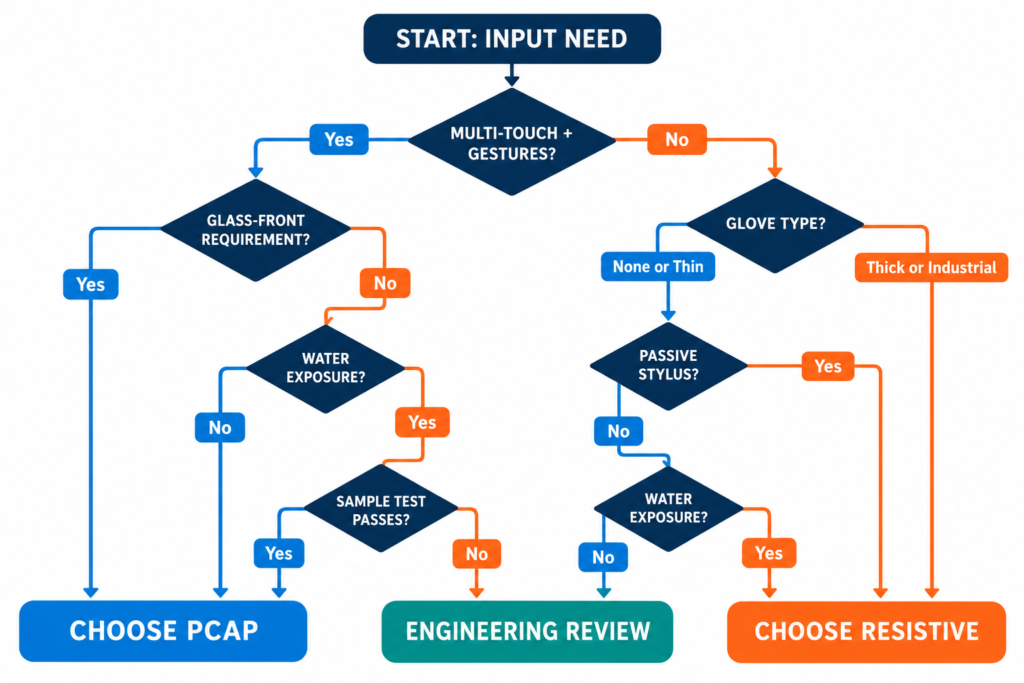
When Should You Choose Capacitive Touch?
Choose PCAP as the starting point when most of these statements are true:
- Users operate the screen mainly with bare fingers.
- The interface uses swipes, pinch, rotation, or multiple simultaneous contacts.
- A rigid, flush glass front is important for appearance or cleaning.
- The product is a kiosk, POS terminal, commercial display, or modern HMI.
- Compatible gloves and wet-use behavior can be validated and tuned.
- The project can control grounding, electrical noise, cover glass, and controller firmware.
Explore the current capacitive touchscreen monitor direction when these requirements match the project.
When Should You Choose Resistive Touch?
Choose resistive touch as the starting point when most of these statements are true:
- The interface needs deliberate single-point activation rather than gestures.
- Operators use thick or varied gloves that cannot be controlled.
- A blunt passive stylus is required for precise target selection.
- Conductive moisture or contamination makes conventional PCAP behavior difficult.
- The application uses a legacy control interface designed for resistive input.
- The project accepts a flexible operating surface and its maintenance requirements.
Resistive touch remains a valid engineering option. It is not simply an obsolete version of capacitive touch. The important question is whether the selected sensor, controller, surface, and user interface fit the equipment.
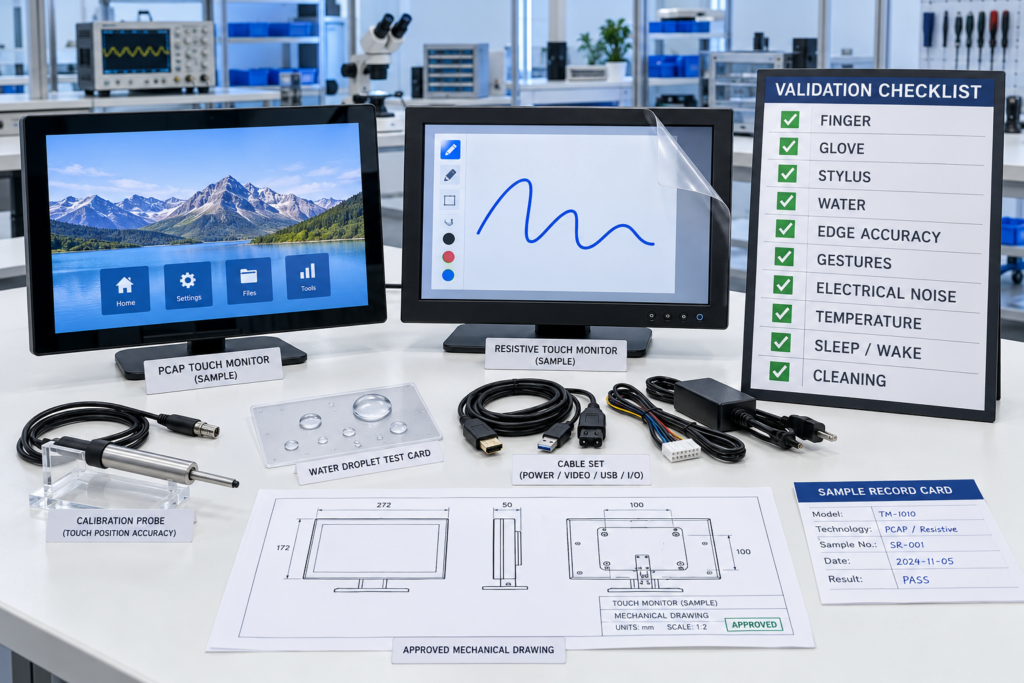
Test the Complete Sample Before Choosing
Ask the supplier to build and document the intended production stack, then test it with the real host and application.
- Input tools: bare fingers, each approved glove, every stylus, and any cleaning cloth that may contact an active screen.
- Touch behavior: taps, holds, drags, edge and corner targets, rapid repeated input, and every required gesture.
- Contamination: representative dry dust, oil, condensation, droplets, streaming water, and cleaning liquid where applicable.
- Electrical conditions: production power supply, full display brightness, radio operation, motors or inverters, grounding, and final cable routing.
- Mechanical stack: production cover glass or overlay, printing, adhesive, gasket, bezel, mounting pressure, and enclosure.
- Environmental conditions: required temperature and humidity states, including recovery after a change in conditions.
- Host behavior: boot, sleep, wake, reconnect, orientation, driver installation, calibration, and recovery after power interruption.
- Maintenance: approved cleaning, paper or tool contact, component replacement, recalibration or retuning, and access without damaging seals.
Record the sensor, controller, firmware, display, glass or overlay, adhesive, cables, host OS, driver, and mechanical drawing used in the approved sample. A later substitution can change touch behavior even when the diagonal size remains the same.
Questions to Put in the RFQ
- Is the proposed technology PCAP, four-wire resistive, five-wire resistive, or another specific construction?
- What input tools and number of simultaneous contacts are supported on the quoted configuration?
- Which sensor, controller, firmware, and host interface will be supplied?
- Does the target operating system need a driver or calibration utility?
- What cover glass, overlay, bonding, surface treatment, and printing are included?
- What are the supported glove materials and thicknesses, and how were they tested?
- How does the system behave with droplets, standing water, cleaning cloths, or conductive liquid?
- What grounding, shielding, cable, and power requirements apply?
- Which environmental, impact, chemical, and lifecycle tests apply to the exact model?
- What changes require controller retuning or recalibration?
- How are replacement touch assemblies controlled over the product lifecycle?
- Can the supplier provide a dimensioned drawing and production-representative sample?
Common Misconceptions
“Capacitive touch never works with gloves.”
Incorrect. PCAP can work with compatible gloves when the sensor, controller, cover stack, grounding, and firmware support them. Test the exact gloves rather than relying on a generic glove-mode statement.
“Resistive touch cannot support more than one contact.”
Conventional resistive systems are normally single-point, but specialized dual-touch and multi-touch designs exist. If multiple contacts are required, demand explicit controller, driver, and application evidence.
“An IP65 monitor will work perfectly when wet.”
An IP rating describes enclosure protection under defined test conditions. It does not by itself define wet-touch accuracy, water rejection, cleaning lockout, or behavior under standing and streaming water.
“PCAP is always more durable.”
PCAP glass resists many forms of surface wear, while resistive overlays have a moving flexible layer. Their impact, scratch, chemical, and replacement risks differ. Compare the actual constructions and failure modes.
“The touch panel can be changed without changing anything else.”
The sensor, controller, firmware, glass or overlay, adhesive, grounding, cables, host interface, and mechanical stack interact. Replacing one part can require new validation.
Frequently Asked Questions
Which touch screen is best for industrial use?
Both can be suitable. PCAP fits modern multi-touch HMIs with a glass front. Resistive fits deliberate single-point controls, passive styluses, and many thick-glove workflows. Select against the actual operator, contamination, UI, electrical noise, and maintenance method.
Is capacitive touch more responsive than resistive touch?
PCAP normally responds to light contact and therefore feels faster in finger-led interfaces. Resistive touch requires actuation force. Actual latency and tracking also depend on the controller, scan rate, filtering, driver, host, and application.
Which technology works with any glove?
Neither should be specified as “any glove” without testing. Resistive touch works with many gloves because input is pressure-based. PCAP requires a glove and controller combination that produces a detectable capacitive change.
Can a resistive screen use a normal plastic stylus?
Usually, yes, if the stylus has a blunt, non-damaging tip and applies sufficient pressure. Confirm the supplier’s approved stylus and surface requirements.
Can a capacitive screen detect pressure?
Standard PCAP detects changes in capacitance, not mechanical pressure. Some controllers may report a derived contact-size or pressure-like value, but true pen pressure requires a compatible sensing and pen system.
Which technology is easier to clean?
A flush PCAP glass surface is often easier to wipe because it can avoid a raised bezel around the active area. A sealed resistive assembly can also be cleaned effectively. Surface material, chemicals, seams, gasket design, and whether touch is locked during cleaning determine the result.
Can I replace a resistive screen with a capacitive screen?
Not as a simple like-for-like substitution. The controller, host interface, driver, power, mechanical opening, glass or bezel, grounding, user interface, and input method may all need review.
Choose the Touch Technology Around the Real Application
Lucky-XFC supports projected-capacitive and applicable resistive touch integration for custom monitors, open-frame displays, kiosks, and industrial touch screens. The recommended path depends on screen size, mounting, input method, cover structure, host system, controller interface, gloves, moisture, electrical environment, and production quantity.
Send the application workflow, installation drawing, target screen size, operating system, required gestures, glove and stylus samples, environmental conditions, and destination-market requirements. Lucky-XFC can review the display structure and prepare a production-representative configuration for validation. Discuss your touch screen project.