
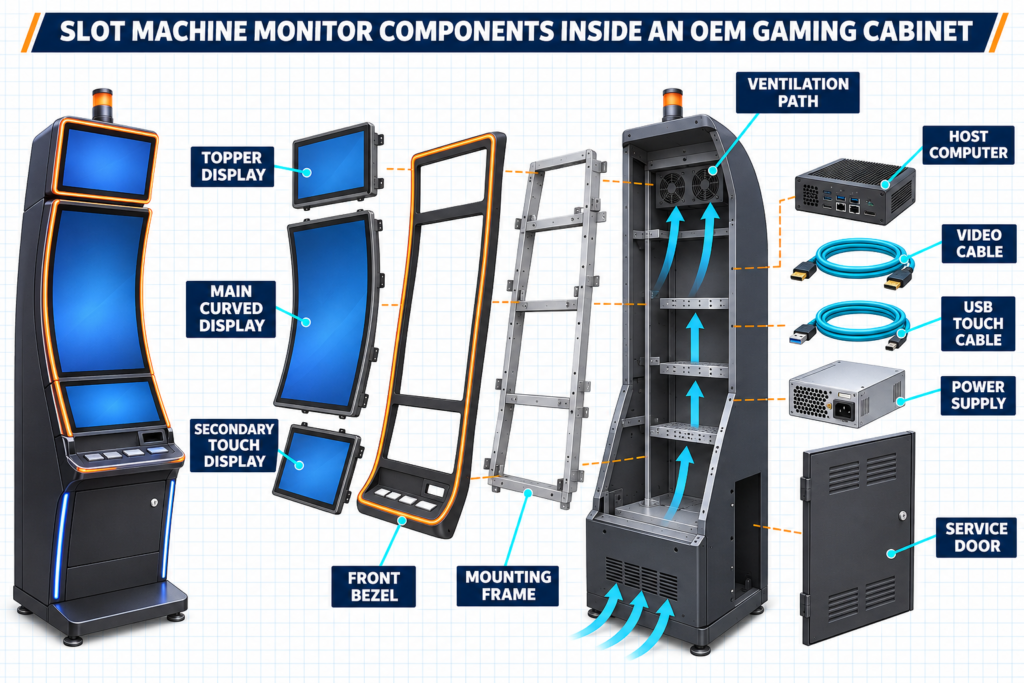
A slot machine monitor should be selected as part of the complete gaming cabinet, not as a standalone screen. The correct display must fit the cabinet profile, match the host computer’s video output, align with the artwork and touch area, accept the approved power arrangement, manage heat inside the enclosure, and remain available throughout production and service.
The diagonal size is only a starting point. Two monitors with the same advertised size can have different active areas, outer dimensions, curvature, depth, mounting points, connectors, touch controllers, and power requirements. Any of those differences can stop a replacement from fitting or force a cabinet redesign.
This guide explains how gaming-machine manufacturers, cabinet builders, system integrators, and replacement-display buyers can specify and approve a flat, C-shaped, J-shaped, or open-frame slot machine monitor.
Define the Screen’s Role Before Comparing Models
One cabinet can contain several displays with different requirements. Identify the role of each screen before sending an RFQ.
| Display role | Typical priorities | Common integration risk |
|---|---|---|
| Main game display | Image quality, viewing angle, shape, synchronization, long operating schedule | Correct diagonal size but wrong active area or cabinet profile |
| Primary touch display | Touch accuracy, cover glass, edge targets, latency, coordinate mapping | Touch sensor and artwork do not align |
| Secondary information screen | Compact fit, interface compatibility, brightness balance | Different timing or scaling from the host output |
| Upper or topper display | Visibility at distance, orientation, mounting, cable length | Excess brightness, inadequate support, or wrong content aspect ratio |
| Progressive or jackpot display | Multi-screen signal distribution, readable typography, lifecycle | EDID or signal-recovery problems in a display chain |
| Replacement monitor | Mechanical equivalence, electrical compatibility, controlled change | Buying by size alone and discovering incompatible mounting or power |
State whether the display is touch or non-touch, portrait or landscape, flat or curved, part of a multi-screen system, and intended for a new cabinet or an installed-base replacement. This keeps the specification focused on the real integration job.
Measure the Cabinet Before Choosing Screen Size
Nominal size describes the diagonal of the panel’s active area. It does not define the complete monitor.
Record these dimensions from the cabinet drawing or a measured reference unit:
- visible opening width and height;
- required active display area;
- total monitor width, height, and depth;
- bezel overlap and artwork boundary;
- portrait or landscape orientation;
- mounting-hole, stud, rail, or bracket positions;
- connector locations and insertion direction;
- cable bend radius and service clearance;
- ventilation space and airflow direction;
- glass outline, thickness, edge finish, and printed border;
- curvature radius or full side profile for curved displays.
For a curved screen, a single radius does not describe every installation. The buyer may also need a profile drawing, chord length, arc height, straight-edge reference points, transition area, and mounting datum. For a J-shaped display, the long face, curved transition, and side extension must align with the cabinet surfaces and touch artwork.
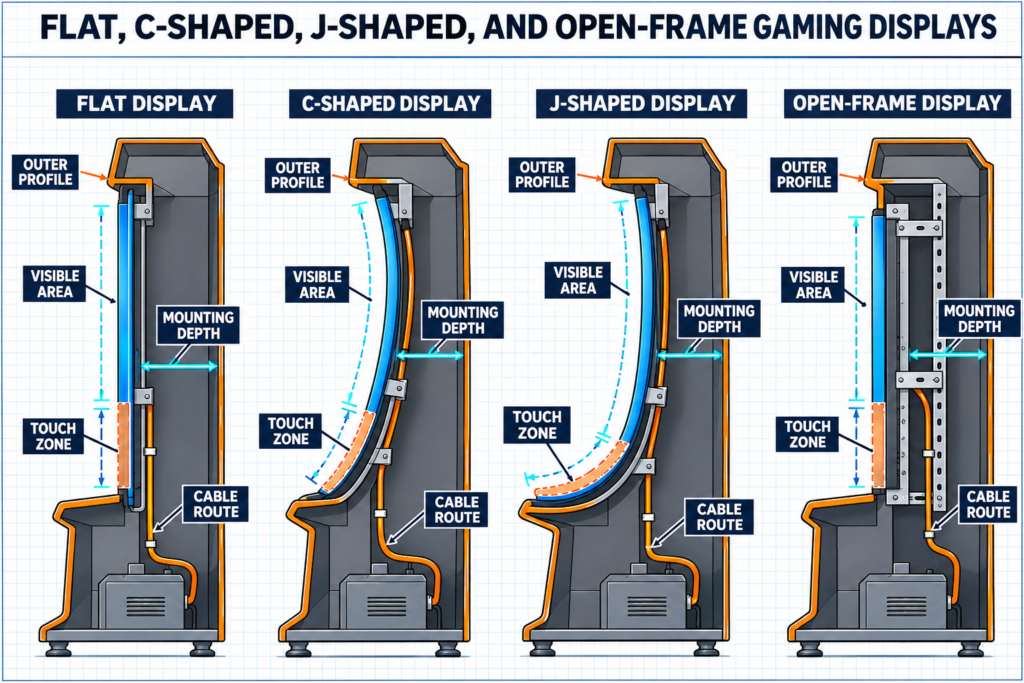
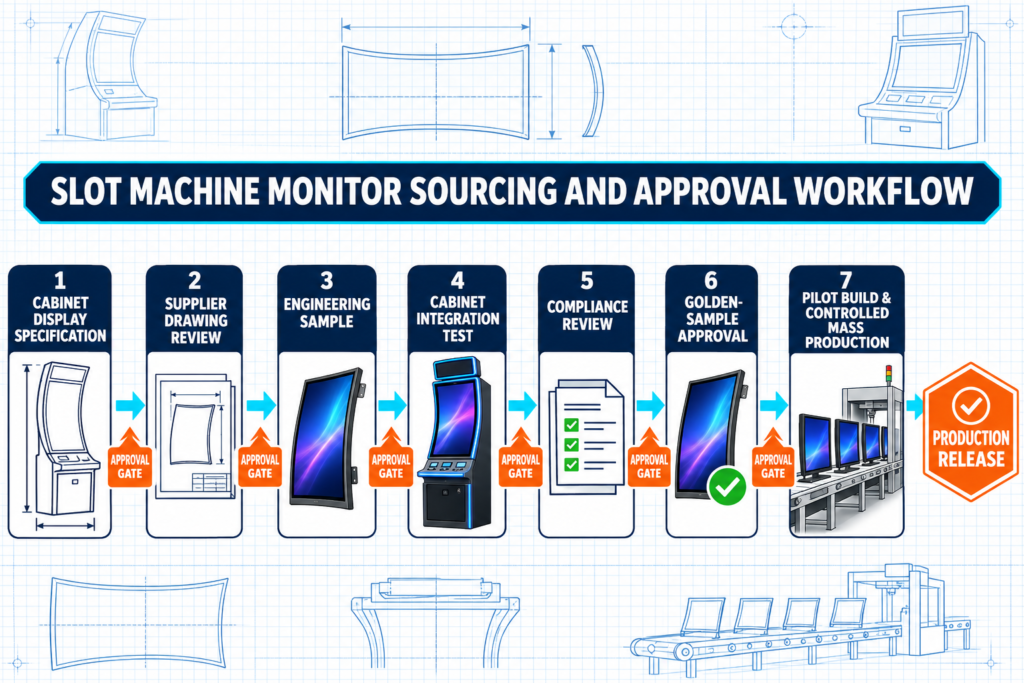
Send a 2D drawing and, where possible, a 3D cabinet model. Mark critical tolerances, not only nominal dimensions. The display supplier should return an approved monitor drawing so both teams work from the same datum system.
Choose Flat, C-Shaped, or J-Shaped From the Cabinet Architecture
| Display format | Best starting use | Main advantages | Main engineering work |
|---|---|---|---|
| Flat | Conventional openings, secondary screens, replacement projects | Familiar geometry and simpler mounting | Match active area, bezel, depth, interface, and power |
| C-shaped curved | Continuous curved main viewing surface | Distinctive cabinet form and continuous presentation | Control radius, profile, touch lamination, mounting, content mapping, and heat |
| J-shaped curved | Main front area plus curved side extension | Supports wraparound cabinet styling and side interaction | Confirm the complete side profile, touch area, artwork, and cable route |
| Open-frame | Custom cabinet where the enclosure supplies the finished exterior | Flexible integration and service design | Cabinet builder owns the external protection, mounting boundary, and airflow |
A C-shaped monitor is not automatically better than a J-shaped or flat model. The cabinet profile, content design, interaction area, and production risk determine the correct option.
For curved projects, compare the complete curved touch monitor family before selecting a specific profile. Lucky XFC provides separate starting points for C-curved slot machine monitors and J-curved slot machine monitors, but the final dimensions and configuration still need an approved project drawing.
Specify Display Performance From the Content and Viewing Position
The host output, game artwork, viewing distance, cabinet lighting, and screen geometry should determine the display specification.
Resolution
Choose a native resolution supported by the host computer and content pipeline. Full HD can be appropriate when the game content is designed for 1920 × 1080. A 4K panel adds detail only when the host, cable, controller, content, and viewing conditions support 3840 × 2160.
Do not assume that higher resolution is automatically an upgrade. It can change GPU load, scaling, boot behavior, cable requirements, thermal load, and touch-coordinate mapping. Test the production software at native resolution.
Refresh rate and motion
Specify the required input timing and refresh rate. Confirm that the controller board, interface, cable length, and panel support the same timing. Review motion clarity, frame pacing, tearing, and recovery after signal changes with representative content.
A “high refresh rate” option must be tied to an exact panel and controller combination. The same product family may not support the same refresh rate at every size and resolution.
Brightness and reflections
Evaluate brightness through the finished glass and inside the actual cabinet lighting environment. Tinted cover glass, printed artwork, reflections, viewing angle, and ambient lighting can reduce perceived clarity. More brightness also increases power and heat.
Specify minimum acceptable luminance, viewing positions, cover-glass transmission, surface treatment, and brightness control. Avoid selecting a high-brightness panel before confirming the cabinet’s thermal capacity.
Color and screen-to-screen matching
For multi-screen cabinets, define whether adjacent displays require similar white point, color, luminance, and viewing-angle appearance. If matching matters, include acceptance tolerances and a measurement method. A visual check alone can become inconsistent across batches.
Long operating schedules
Ask how the stated backlight life is defined, under what brightness and temperature conditions it is measured, and what end-of-life criterion is used. Also define pixel-defect policy, image-retention expectations, uniformity, warm-up behavior, and acceptable luminance drift.
Design the Touch System as a Complete Stack
A touch-enabled slot machine monitor combines the cover glass, printed border, adhesive or bonding layer, sensor, controller, firmware, grounding, display electronics, USB or other data connection, operating-system driver, and application coordinates.
Projected capacitive touch, or PCAP, is a common choice for modern glass-front cabinets because it supports smooth interaction and multi-touch. Its actual behavior depends on the complete stack. Thick glass, decorative printing, curved lamination, nearby metal, electrical noise, and grounding can all affect tuning.
Define:
- number of required touch points;
- finger, glove, or stylus conditions if applicable;
- target sizes and edge interaction;
- tap, drag, hold, and gesture behavior;
- acceptable latency and coordinate stability;
- touch active area relative to the visible image;
- controller model and firmware revision;
- interface and driver requirements;
- orientation and calibration method;
- behavior after host restart, USB reconnection, and display replacement.
Test the actual cabinet artwork and application. A touch sensor can pass a general functional test while still missing small edge targets or mapping incorrectly after portrait rotation.

Confirm Video, Touch, Power, and Network Paths Separately
Do not summarize all connections as “HDMI and USB.” Create a connection schedule for every display.
Video
Record the host output, monitor input, native resolution, refresh rate, color format, cable length, connector orientation, retention method, and any adapter or splitter. Confirm EDID behavior, boot display selection, signal-loss recovery, and whether the monitor automatically changes input.
Touch data
Video and touch usually travel through different paths. USB commonly carries touch data, but the approved controller and host determine the exact connection. In a multi-screen cabinet, confirm that each touch device maps to the correct display after every reboot or service event.
Power
Record input voltage, tolerance, connector, polarity, grounding, power consumption, inrush behavior, fuse or protection arrangement, and startup sequence. A connector that fits does not prove electrical compatibility. Some custom display families may use different power inputs by size or configuration.
Network and integrated modules
An RJ45 connector or optional 4G module normally belongs to an integrated controller, Android unit, or computer configuration. A basic external-host monitor does not need network connectivity to display video and return touch coordinates. Clarify whether the quotation covers a monitor, smart display, or panel PC.
Control Heat Inside the Gaming Cabinet
Display life and stability depend on the temperature around the LCD, LED backlight, controller board, touch controller, and power components. A closed cabinet with decorative lighting, speakers, power supplies, and a gaming computer can operate much warmer than the room.
Create a thermal plan that includes:
- expected ambient temperature around the display;
- heat from the host computer and cabinet lighting;
- intake and exhaust locations;
- fan capacity, filters, and service intervals;
- blocked-airflow conditions;
- maximum-brightness operation;
- portrait mounting effects;
- temperature at critical boards and the panel surface;
- behavior during long continuous operation.
For a curved or tightly fitted display, review heat paths across the complete housing. A thinner profile or sealed decorative structure may reduce airflow. The production sample should be tested in the actual cabinet, not only on an open bench.
Match the Compliance Plan to the Destination Market
Gaming-device approval belongs to the complete machine and its target jurisdiction. The display supplier’s CE, FCC, RoHS, safety, or EMC documents do not by themselves approve a slot machine for operation.
Gaming Laboratories International publishes GLI standards used by many jurisdictions as starting points, while noting that each jurisdiction has authority to set its own requirements. GLI-11 addresses gaming devices, but the manufacturer should confirm the current jurisdictional rules, laboratory submission plan, and treatment of hardware changes with the responsible test lab and regulator.
For electrical product safety, IEC 62368-1:2023 is a current safety standard for audio/video, information, and communication technology equipment. Whether it applies to the monitor, subassembly, or complete gaming machine depends on the product scope and destination requirements.
For the European market, the current EMC Directive 2014/30/EU regulates electromagnetic compatibility of equipment, while the RoHS Directive 2011/65/EU restricts specified hazardous substances in electrical and electronic equipment within its scope.
Before ordering, define:
- target countries and gaming jurisdictions;
- legal manufacturer and certificate holder;
- monitor versus complete-machine compliance responsibility;
- exact standards, editions, and test configurations;
- laboratory, sample quantity, and documentation ownership;
- hardware and firmware changes that require notification or retesting.
Only cite a certificate when its model list, configuration, scope, issue date, and validity match the proposed display. A report for another size, controller, adapter, or enclosure may not cover the production unit.
Handle Replacement Projects as Reverse Engineering
Replacing a discontinued slot machine monitor requires more than finding the same diagonal size. Collect evidence from the original unit before removing it from service.
Request or record:
- Full product label, model, revision, and serial information.
- Active display area and visible cabinet opening.
- Overall dimensions, depth, curvature, and mounting points.
- Native resolution, refresh rate, and supported input timing.
- Video connector and pinout.
- Touch-controller model, connection, driver, and coordinate orientation.
- Power input, polarity, connector, and measured operating conditions.
- Glass outline, printed border, sensor area, and artwork alignment.
- Cable direction, strain relief, and service-clearance limits.
- Photos of the original monitor installed and removed.
Use the original monitor and a known-good host as references during sample testing. Do not assume that an adapter can solve every mismatch. Signal conversion, scaling, power conversion, or a different touch controller can affect boot behavior, EMC, service procedures, and regulatory approval.
Validate Multi-Screen Cabinets as One System
In a multi-screen cabinet, each display can work separately and the complete system can still fail after reboot, cable replacement, or software update.
Test:
- display enumeration order;
- primary-display assignment;
- EDID handling and resolution retention;
- touch-device mapping;
- portrait and landscape orientation;
- synchronized startup and signal recovery;
- behavior when one screen is disconnected;
- splitter, extender, or converter recovery;
- brightness and color balance between screens;
- cable routing and electromagnetic interaction.
Save the approved operating-system display configuration, driver versions, touch-controller firmware, and connection diagram. Service technicians should be able to restore the correct mapping without trial and error.
Approve a Production-Representative Sample
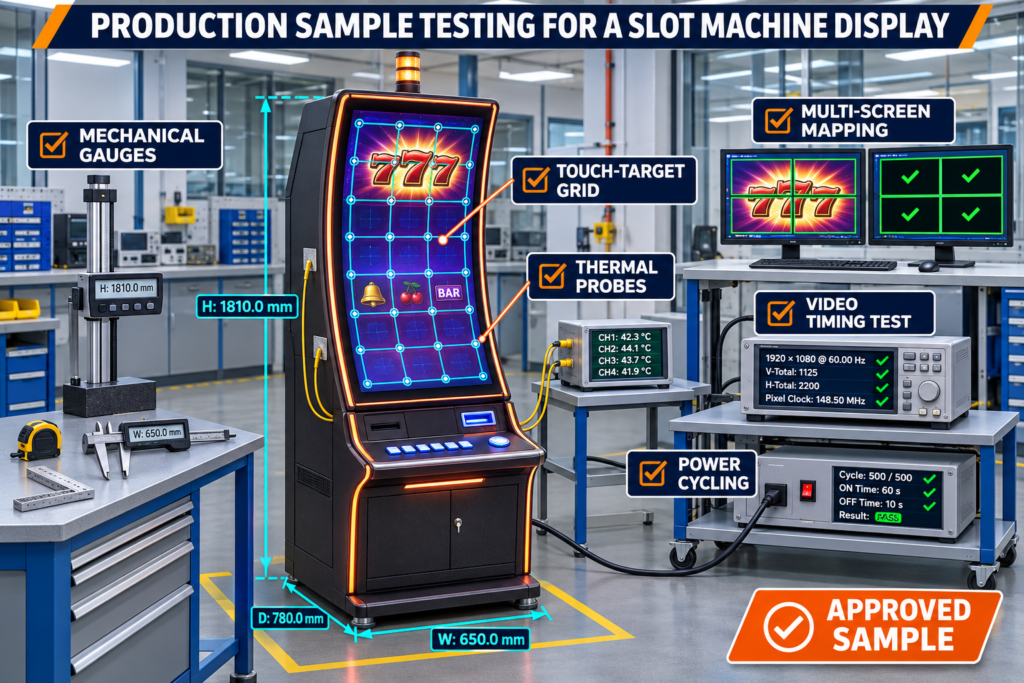
The sample should match the proposed production unit in panel, controller, touch sensor, firmware, cover glass, housing, connectors, power arrangement, and cables. Document any temporary substitute and its effect on later validation.
Install the sample in the production cabinet and run a defined acceptance plan:
| Test group | Minimum checks |
|---|---|
| Mechanical | Fit, active-area alignment, bezel gap, mounting, connector access, cable clearance, service removal |
| Image | Native resolution, timing, brightness, reflections, color, viewing angle, motion, pixel policy |
| Touch | Accuracy, edge targets, drag, multi-touch, latency, mapping, restart, reconnection |
| Electrical | Input voltage, power sequence, inrush behavior, grounding, connector retention |
| System | Boot order, EDID, signal loss, sleep/wake, multi-screen recovery, software scaling |
| Thermal | Stabilized cabinet temperature at maximum expected load and brightness |
| Reliability | Extended operation, repeated power cycling, cable movement, control operation |
| Compliance | Project-defined safety, EMC, material, and gaming-jurisdiction evidence |
Record the sample model, serial number, firmware, test setup, results, exceptions, and approval signatures. Retain a golden sample or a controlled photo and measurement record for production comparison.
Freeze the Configuration and Change-Control Rules
Gaming equipment programs can remain in service after the original panel or controller becomes obsolete. Procurement should therefore evaluate lifecycle and change control before approving the supplier.
Control these items:
- LCD panel manufacturer and model;
- timing controller or display controller board;
- touch sensor, controller, and firmware;
- cover glass, printing, adhesive, and bonding method;
- housing, brackets, fasteners, and mounting points;
- power supply or DC conversion board;
- video, touch, and power connectors;
- cable assemblies and lengths;
- labels, revision control, and traceability;
- inspection specification and golden sample.
Define product-change notification, end-of-life notice, last-time-buy, replacement validation, and approval responsibilities. A substitute panel can change brightness, color, viewing angle, timing, power, heat, EMC, and mechanical fit even when the diagonal size and resolution remain the same.
Compare Total Project Cost, Not the Display Price Alone
The lowest unit price can become expensive if the monitor requires cabinet modification, adapters, repeated samples, software changes, retesting, or early replacement.
Compare quotations on the same scope:
- monitor and touch assembly;
- custom cover glass and printing;
- bonding, curved lamination, or tooling;
- housing, brackets, and cable assemblies;
- controller, firmware tuning, and driver support;
- power supply or converter;
- samples and engineering changes;
- test reports and certification work;
- packaging for curved or large displays;
- spare units, repair, and replacement support;
- lifecycle and change-notification commitment.
Ask suppliers to separate standard features, optional features, one-time engineering charges, tooling, and recurring unit costs. This makes technically different offers easier to compare.
Slot Machine Monitor RFQ Checklist
Send the following information with the inquiry:
Cabinet and mechanical data
- cabinet drawing, 3D file, and installation photos;
- screen role and orientation;
- flat, C-shaped, J-shaped, or custom profile;
- visible opening, active area, external dimensions, and depth;
- mounting points, bezel, glass, cable route, and service access.
Display and touch data
- required resolution, timing, refresh rate, brightness, and viewing angle;
- touch or non-touch;
- number of touch points, target sizes, edge controls, and gestures;
- cover-glass outline, printed border, and surface treatment;
- expected operating schedule and cabinet lighting.
Electrical and software data
- host computer, GPU output, operating system, and game resolution;
- video connector and cable length;
- touch-data interface and driver policy;
- power input, connector, polarity, and startup sequence;
- multi-screen mapping and recovery requirements.
Commercial and compliance data
- destination markets and gaming jurisdictions;
- required safety, EMC, environmental, and material documents;
- sample quantity and approval schedule;
- annual demand and expected service life;
- packaging, traceability, spares, repair, and change-control expectations.
Lucky XFC Slot Machine Monitor Options
Lucky XFC’s current slot machine monitor and display range provides flat, C-shaped, J-shaped, vertical, touch-enabled, and open-frame directions for gaming-cabinet integration and replacement projects.
Current catalog starting points include 32-, 43-, 49-, and 55-inch C-shaped displays; 43-, 49-, and 55-inch J-shaped displays; and selected flat touch displays from 21.5 to 43 inches. Full HD is a common starting resolution, while 4K, high brightness, and high refresh rates are model-dependent options. Interfaces, input voltage, exact brightness, touch structure, and panel availability must be confirmed for the approved size and configuration.
For conventional custom enclosures, an open-frame touch monitor may provide a simpler integration path than a finished curved housing. Lucky XFC can review cabinet openings, active areas, touch glass, mounting points, interfaces, power, housing, logo, and project documentation through sample approval and production inspection.
Send the cabinet drawing, screen role, required shape, active area, touch specification, host output, power input, target quantity, and destination requirements through the project contact page for a model and feasibility review.
Frequently Asked Questions
What is a slot machine monitor?
A slot machine monitor is a commercial display integrated into a gaming cabinet. It may be flat, curved, vertical, touch-enabled, or non-touch and normally connects to an external gaming computer or controller.
Are “slot machine monitor” and “slot machine display” the same?
They often refer to the same product category. “Monitor” usually suggests a complete assembly with controller and interfaces, while “display” can also describe the panel or an integrated module. The quotation should state exactly what is included.
Which is better: a C-shaped or J-shaped slot machine monitor?
Neither is universally better. A C-shaped screen suits a continuous curved front surface. A J-shaped screen suits a cabinet with a front display area that extends around one side. Select from the cabinet profile and interaction design.
Can I replace an old slot monitor with any screen of the same size?
No. Match the active area, outer dimensions, depth, curvature, mounting points, resolution, timing, video connector, touch controller, power input, and software behavior. The diagonal size alone is insufficient.
Does a slot machine monitor include the gaming computer?
Usually not. A standard monitor displays video and may return touch coordinates. A panel PC or smart display includes computing hardware, but that must be explicitly specified.
When should I choose 4K?
Choose 4K when the host and content output 3840 × 2160, the interface supports the required timing, and the screen size and viewing conditions benefit from the additional detail. Validate scaling, heat, power, and touch mapping.
What should be tested before mass production?
Test mechanical fit, active-area alignment, image output, touch behavior, video and USB recovery, power sequencing, cabinet temperature, multi-screen mapping, extended operation, and all project-specific compliance requirements using a production-representative sample.
Does CE or FCC documentation approve the complete slot machine?
No. Display-level documents address their stated product and test scope. Gaming-device approval depends on the complete machine, target jurisdiction, laboratory submission, and applicable regulations.
What information produces the most accurate quotation?
Provide the cabinet drawing, screen role, flat or curved profile, active and external dimensions, touch requirements, glass artwork, host output, resolution and timing, power input, mounting, quantity, and destination compliance requirements.
Final Recommendation
The best slot machine monitor is the configuration that fits the cabinet and remains controlled through production and service. Select the screen shape from the cabinet profile, then approve the active area, optical performance, touch stack, signal timing, power, thermal design, mounting, compliance scope, and change-control process as one system.
Start with the cabinet drawing and production host. Test a representative sample in the complete machine, retain a golden configuration, and require notification before any panel, controller, firmware, glass, power, or mechanical change.
For a custom quotation, send Lucky XFC the cabinet drawing, screen shape, active area, touch requirement, host output, power input, quantity, and destination requirements for an engineering review.