
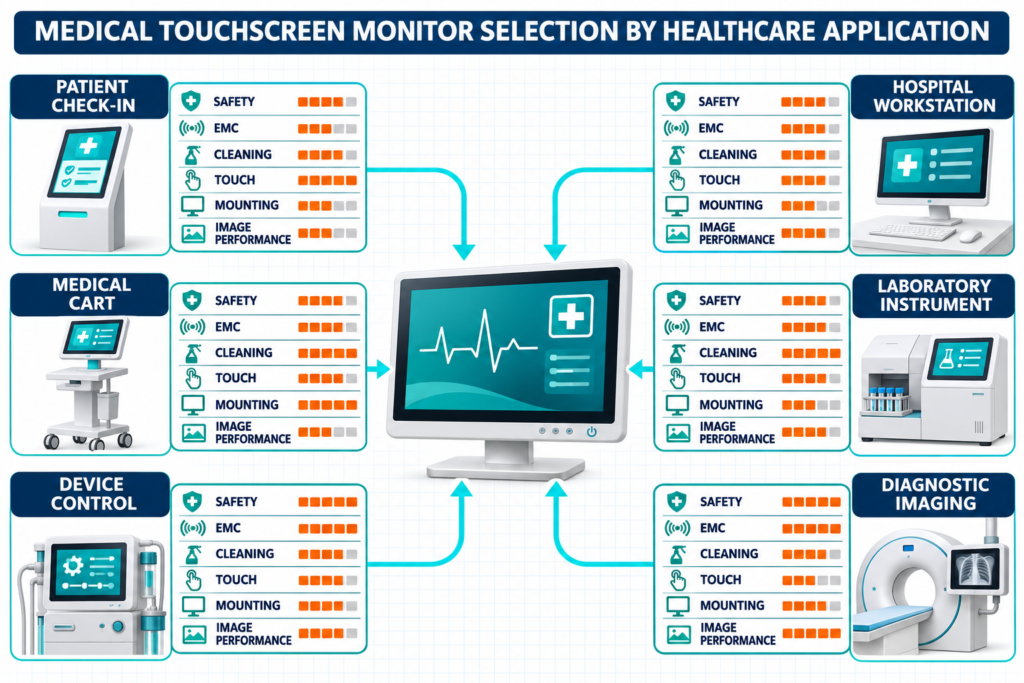
A medical touchscreen monitor should be selected by its intended use, installation environment, and role in the final equipment—not by the words “medical grade” alone. A display for a patient check-in terminal, a control interface on a laboratory analyzer, and a diagnostic imaging workstation can require very different evidence, performance, and risk controls.
For procurement teams, the practical rule is simple: define the application first, identify the standards and tests that apply to the exact configuration, and then verify the monitor inside the final system. A medical power adapter, an IP-rated front panel, or an antimicrobial coating can be useful features, but none of them independently proves that a complete monitor or medical electrical system is compliant.
This guide explains how OEMs, medical device manufacturers, and healthcare system integrators can specify, compare, sample-test, and approve a medical touchscreen monitor.
Start With the Monitor’s Intended Role
Before requesting a quotation, state what the screen does and what happens if it fails, freezes, shows the wrong information, or accepts an unintended touch. This determines whether the project needs a configurable commercial display, an industrial display adapted for healthcare use, or a monitor with documented medical electrical testing.
| Application | Primary selection concerns | Questions to resolve before sourcing |
|---|---|---|
| Patient check-in or information terminal | Cleanability, accessibility, durability, privacy, simple service | Is it only an administrative terminal, or does it perform a regulated medical function? |
| Hospital workstation or nursing station | Readability, cleaning, continuous operation, mounting, IT compatibility | Will it display data for reference, or support clinical decisions? |
| Medical cart | Low-profile mounting, cable retention, power arrangement, stability, cleaning | Is the monitor part of medical electrical equipment or a separate IT display? |
| Laboratory or IVD instrument | Embedded integration, glove/stylus input, chemical resistance, lifecycle stability | Which safety, EMC, and IVD-specific requirements apply to the complete instrument? |
| Medical device control interface | Touch reliability, fail-safe behavior, usability, EMC, exact configuration control | Could a missed or false touch create an unacceptable risk? |
| Diagnostic or image-review workstation | Luminance behavior, calibration, ambient light, resolution, quality assurance | Is the display used for primary diagnosis, clinical review, or only navigation and control? |
The same monitor can be acceptable in one workflow and inappropriate in another. Record the target countries, intended users, proximity to the patient, expected accessories, cleaning agents, mounting method, duty cycle, and lifetime supply requirement in the request for quotation.
What “Medical Grade” Should Mean in a Purchase Specification
“Medical grade” is not a complete technical specification. A useful purchase document replaces that label with measurable requirements and named evidence.
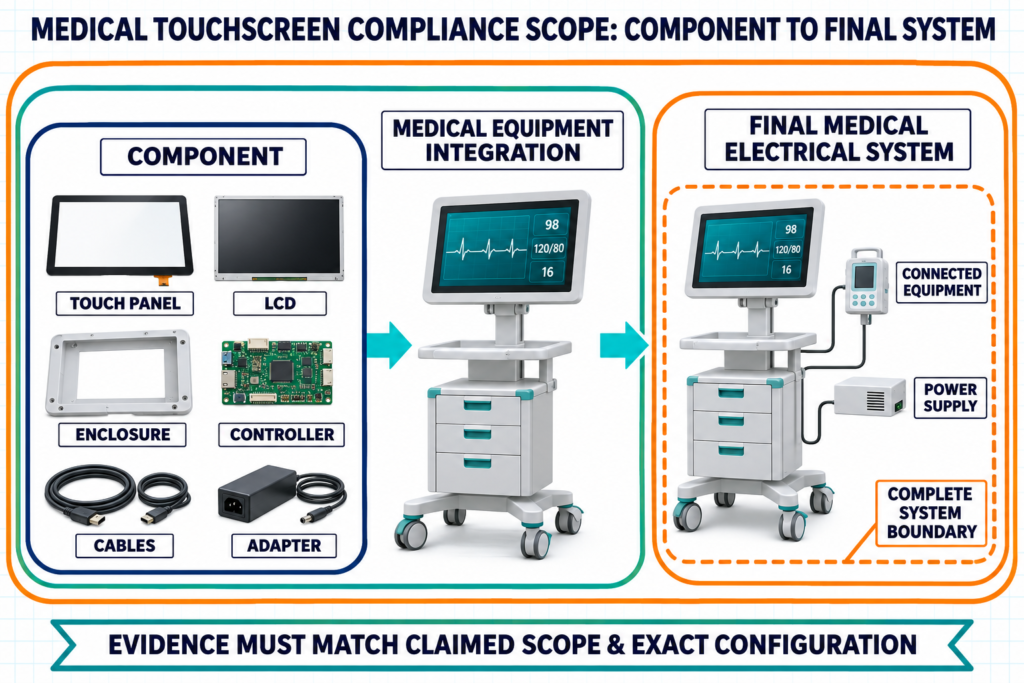
For medical electrical equipment, IEC 60601-1 addresses general requirements for basic safety and essential performance. The IEC notes that collateral or particular standards may supplement or modify the general standard, and a relevant particular standard should not be ignored. IEC 60601-1-2 addresses electromagnetic disturbances and emissions for medical electrical equipment and systems. The applicable editions, national adoptions, deviations, product scope, and final-system responsibility should be confirmed with the project’s regulatory and test-laboratory specialists.
Use the following evidence hierarchy when comparing suppliers:
- Exact-model certificate or declaration: Confirm the full model number, configuration, power supply, report number, standard edition, laboratory, certificate holder, and validity.
- Test report: Check whether the tested sample matches the proposed touch panel, LCD, enclosure, controller, cables, and adapter.
- Component-level evidence: Useful for risk analysis, but it does not automatically establish compliance of the assembled monitor or final medical electrical system.
- Supplier statement or brochure claim: Treat it as a starting point that requires documentary verification.
A report for another size, a different adapter, or a visually similar product is not equivalent evidence. Ask the supplier to identify permissible variants and explain how later component substitutions will be controlled.
Build a Standards and Risk Matrix Before You Compare Models
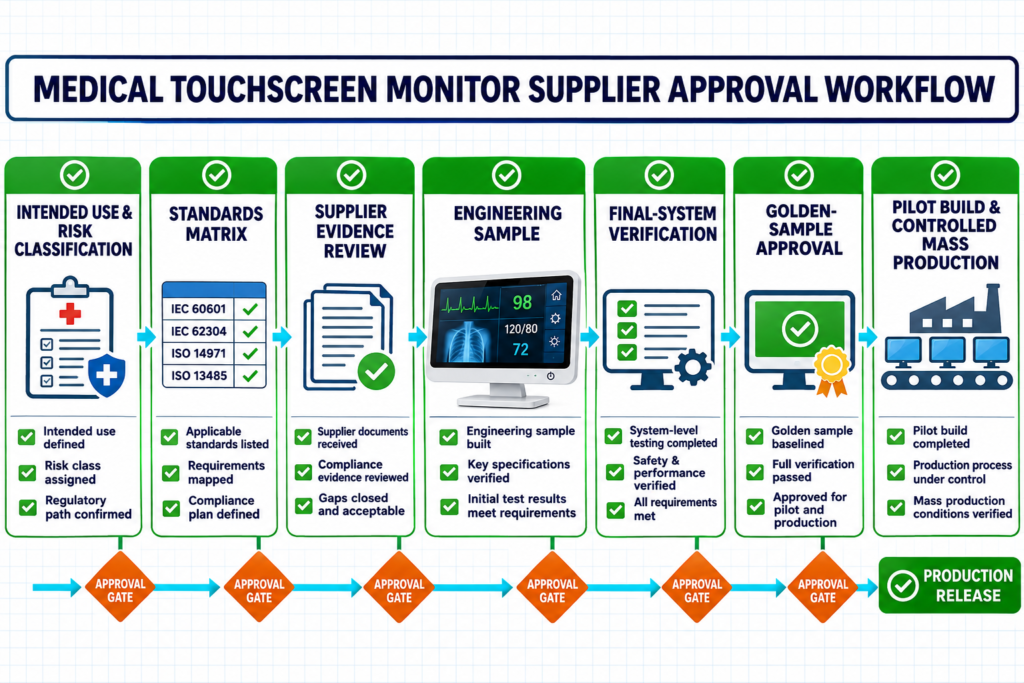
The standards matrix should be owned by the legal manufacturer of the final device, with input from regulatory, quality, engineering, and the chosen test laboratory. Depending on intended use and market, the evaluation may include:
- Electrical safety and essential performance: IEC 60601-1 and any applicable collateral or particular standards.
- Electromagnetic compatibility: IEC 60601-1-2 and market-specific regulatory expectations. The FDA’s EMC guidance recommends EMC test information and labeling for electrically powered medical devices and electronic accessories within its scope.
- Risk management: ISO 14971:2019 provides a lifecycle process for identifying hazards, estimating and evaluating risks, implementing controls, and monitoring their effectiveness.
- Usability engineering: IEC 62366-1 specifies a usability engineering process related to medical-device safety, including risks associated with correct use and use errors.
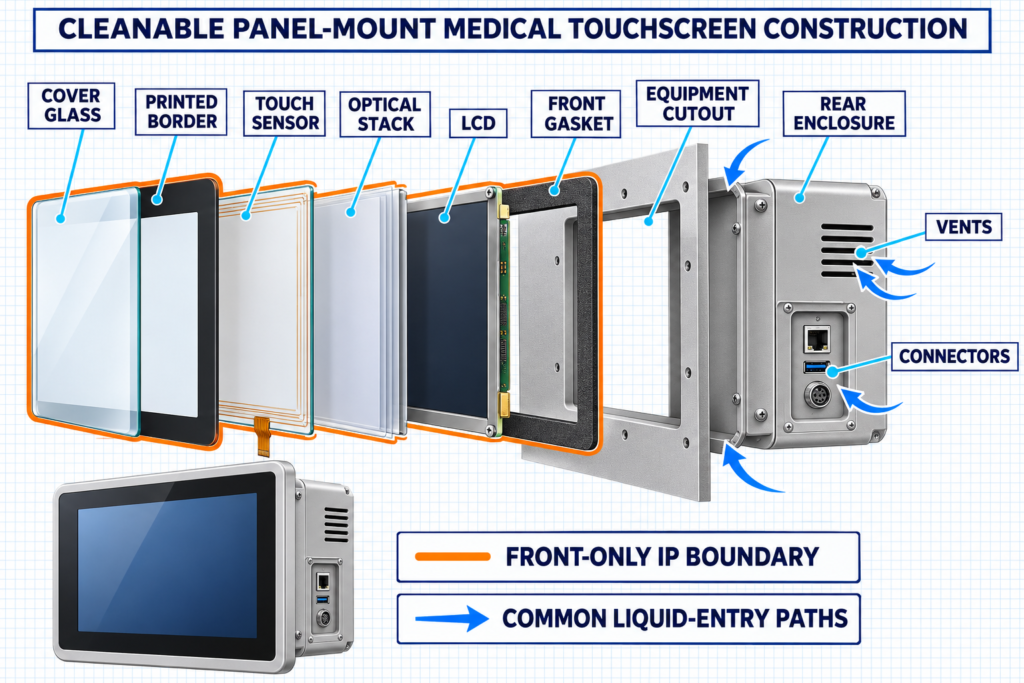
- Ingress protection: IEC 60529 classifies protection provided by enclosures. Verify whether a quoted IP rating applies only to the front face or to the entire enclosure, and whether it remains valid after installation.
- Imaging display behavior: For applicable grayscale imaging workflows, the current DICOM PS3.14 Grayscale Standard Display Function addresses standardized grayscale presentation and methods associated with display-system conformance. DICOM calibration alone does not define every performance requirement for a diagnostic display.
Do not copy this list into a specification and assume every item applies. The correct set depends on the device, market, environment, intended use, and regulatory pathway. Conversely, a check-in kiosk may not need the same medical electrical evidence as a patient-connected device, but it still needs requirements for cleaning, accessibility, information security, mounting, and reliable operation.
Choose PCAP or Resistive Touch From the Actual Workflow
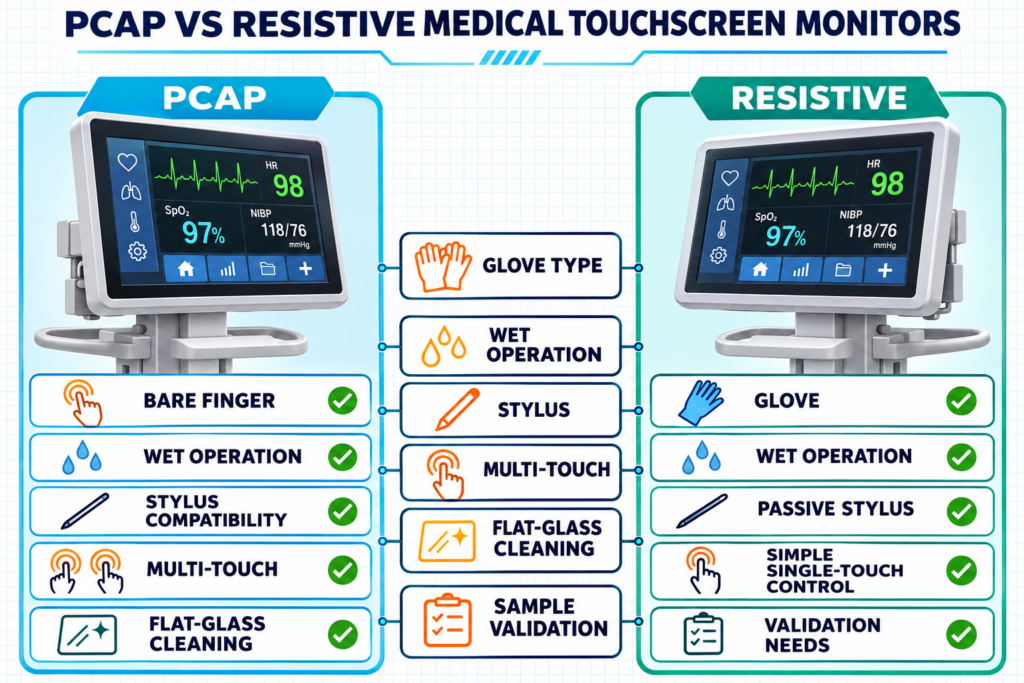
Projected capacitive touch, or PCAP, is widely used for modern flat-front interfaces. It supports smooth multi-touch operation and can be tuned for selected glove types, cover-glass thicknesses, water conditions, and palm rejection. Tuning must be validated with the finished glass, enclosure, grounding, display, controller firmware, gloves, and cleaning conditions; a generic “glove touch” claim is not enough.
Resistive touch responds to pressure and can be appropriate when users need a passive stylus, wear thick gloves, or must operate a legacy interface designed around single-point input. Its layered construction and front-surface durability should be evaluated against the cleaning frequency, chemicals, and mechanical wear expected in service.
| Selection factor | PCAP | Resistive |
|---|---|---|
| Multi-touch gestures | Normally supported | Usually limited |
| Passive stylus | Depends on implementation; often requires a compatible stylus | Commonly supported |
| Thick gloves | Requires configuration and validation | Pressure input can be advantageous |
| Flat, edge-to-edge glass | Well suited | Possible, but construction differs |
| Water and false-touch control | Requires controller tuning and validation | Validate liquids and edge behavior |
| Legacy single-touch systems | May require integration changes | Often easier to match |
Create a touch acceptance test using the exact glove brands and sizes, stylus, disinfectant residue, dry and wet fingers, contact duration, edge targets, drag gestures, and UI button sizes used in the real workflow. Include a recovery test after power interruption, USB reconnection, host reboot, and electrostatic discharge testing.
Specify Cleanability, Not Just an Antimicrobial Claim
Healthcare cleaning is a complete design and maintenance issue. An antimicrobial surface treatment does not replace the facility’s cleaning and disinfection procedure.
Ask for:
- a flat or low-crevice front design where the application needs it;
- the exact front material, coating, print, adhesive, gasket, and seal construction;
- a supplier-approved list of cleaning and disinfecting agents, concentrations, contact times, and wipe methods;
- resistance data for repeated exposure rather than a one-time wipe;
- confirmation that cleaning will not cloud the surface, remove printing, soften seals, cause edge lift, or change touch behavior;
- instructions that prevent liquid entry through vents, connectors, seams, or the rear enclosure.
If an IP65 front is specified, define the mounting cutout, gasket compression, bezel condition, fastener torque, and responsibility for the surrounding equipment panel. “IP65 front” does not mean the rear connectors and enclosure are protected to the same degree.
For a project exposed to moisture or frequent washdown, compare the boundary conditions with a purpose-built waterproof touchscreen solution rather than assuming a sealed-looking bezel provides complete protection.
Define Display Performance by the Task
Screen size and resolution should follow viewing distance, UI layout, required information density, target size, and equipment envelope. Also specify:
- active area and aspect ratio;
- native resolution and scaling behavior;
- minimum and typical luminance after the touch and cover-glass stack;
- contrast, viewing angle, color requirements, and acceptable uniformity;
- anti-glare or anti-reflective treatment and its effect on sharpness;
- ambient lighting and reflections at the installation site;
- warm-up, luminance stability, calibration, and quality-control requirements where relevant;
- pixel-defect policy, image retention expectations, and backlight lifetime definition.
For a control panel, stable readability and correct touch alignment may matter more than very high resolution. For medical images, ordinary claims such as “Full HD,” “4K,” or “wide color gamut” are not substitutes for a defined imaging workflow, calibration capability, ambient-light control, quality-assurance process, and relevant regulatory requirements.
Check Mechanical, Electrical, and Interface Integration Together
The enclosure and connection method affect cleaning, serviceability, EMC, thermal behavior, and certification scope. Common formats include:
- VESA-mounted monitor: useful for arms, carts, and workstations; verify the arm rating, center of gravity, fasteners, cable movement, and tip stability of the complete cart.
- Panel-mount display: appropriate for equipment cabinets and consoles; control the panel cutout, gasket, stud pattern, insertion depth, and service access. See available panel-mount touchscreen monitor structures.
- Open-frame monitor: suitable for embedded equipment when the OEM controls the outer enclosure and integration boundary. Review open-frame touch monitor options early enough to coordinate brackets, cables, and thermal clearances.
- Custom enclosure: useful when connector direction, wall thickness, cleaning geometry, branding, or restricted space prevents a standard housing from fitting.
Confirm the video interface, touch interface, power input, connector retention, cable length, shielding, strain relief, grounding, and service route as one assembly. HDMI or DisplayPort normally carries video; USB commonly carries touch data. A video connection alone should not be assumed to provide touch control.
If the monitor becomes part of medical electrical equipment, evaluate leakage current, isolation, protective earth, power distribution, accessories, and EMC at the appropriate assembly or system level. A certified external adapter can support the design, but it does not by itself certify everything connected to it.
Plan for Configuration Control and Long-Term Supply
Medical equipment programs often outlive consumer display models. Procurement should therefore evaluate the supplier’s change-control process, not only the sample in front of the engineering team.
Request:
- an approved bill of materials or a controlled critical-component list;
- notification periods for panel, touch controller, firmware, adapter, and enclosure changes;
- product change notification and end-of-life procedures;
- form-fit-function rules for replacements;
- traceability by model, revision, lot, and serial number where required;
- spare-unit, repair, calibration, and warranty arrangements;
- retention of drawings, firmware versions, inspection records, and approved samples.
A substitute LCD can change brightness, viewing angle, EMC behavior, optical appearance, backlight lifetime, and mechanical fit. A controller or firmware change can alter glove performance, water rejection, coordinate stability, and host compatibility. Define which changes require written approval, regression testing, or renewed compliance assessment.
Documents to Request Before Approving a Supplier
A credible quotation package should identify assumptions and provide a path to verification. Ask for the following documents for the proposed model and revision:
- Datasheet with guaranteed values separated from typical or optional values.
- Mechanical drawing, mounting detail, cutout, tolerances, and 3D file if needed.
- Interface, pinout, cable, power, and grounding information.
- Touch-controller model, firmware revision, supported operating systems, and driver requirements.
- Display-panel and backlight lifecycle information.
- Cleaning instructions and material-compatibility limitations.
- IP test scope and installation conditions, if an IP rating is claimed.
- Applicable certificates, declarations, and reports with exact model coverage.
- Power-supply evidence and the approved adapter model.
- Manufacturing inspection plan, acceptance criteria, traceability, and change-control process.
- Warranty, repair, spare-unit, and end-of-life policy.
When comparing quotations, normalize what is included. One price may cover a standard industrial monitor, while another includes custom glass, controller tuning, a medical power supply, documentation, laboratory testing, or certification ownership. These are not commercially equivalent offers.
Run a Representative Sample-Approval Test
Do not approve mass production from a desktop demonstration alone. Install the sample in representative equipment with the production host, cables, power architecture, enclosure, software, and mounting hardware.
The validation plan should include:
- image quality under minimum and maximum expected ambient light;
- touch accuracy, latency, edge performance, multi-touch, gloves, stylus, moisture, and cleaning residue;
- repeated cleaning with approved agents and inspection for cosmetic, sealing, and touch changes;
- cold start, warm restart, sleep/wake, signal loss, USB reconnection, and power interruption;
- connector retention, cable motion, strain relief, mounting deflection, cart movement, and service access;
- thermal operation in the final enclosure and expected duty cycle;
- operating-system, driver, application, orientation, and calibration compatibility;
- required electrical safety, EMC, ingress, and risk-control verification at the correct product or system scope;
- comparison against the approved drawing, firmware, bill of materials, and golden sample.
For a useful general pre-purchase screen, combine this project plan with the touchscreen monitor buying checklist, then add the medical-device-specific regulatory and risk controls defined by your team.
Medical Touchscreen Monitor Procurement Checklist
Before issuing a purchase order, verify that the team can answer “yes” to the applicable items below:
- The intended use, users, environment, target markets, and safety relevance are documented.
- The monitor’s boundary within the medical device or medical electrical system is clear.
- Applicable standards, editions, national versions, and particular standards have been reviewed by qualified specialists.
- Certificates and reports match the exact model, configuration, adapter, and claimed scope.
- Display performance is specified for the task, not only by diagonal size and resolution.
- Touch has been tested with the real gloves, stylus, moisture, UI, and cleaning process.
- Front protection and whole-enclosure protection are not being confused.
- Cleaning agents, contact times, and repeated-exposure limits are documented.
- Mounting, cables, grounding, thermal conditions, and service access have been validated in the equipment.
- Component changes, firmware changes, product changes, and end-of-life events require defined notification and approval.
- The golden sample, drawings, firmware, acceptance criteria, and traceability method are controlled.
- Final-system safety, EMC, usability, and risk-management activities remain assigned to responsible parties.
Sourcing a Custom Medical Touchscreen Monitor From Lucky-XFC
Lucky-XFC’s current medical touchscreen monitor range is positioned for medical equipment, hospital workstations, healthcare carts, diagnostic devices, laboratory instruments, and OEM integration. Available project options include PCAP or resistive touch, glove/wet/stylus configurations, standard or custom sizes, open-frame or panel-mount structures, VESA and custom brackets, and interfaces such as HDMI, VGA, DisplayPort, USB touch, Type-C, and RS232.
Compliance must be confirmed per project. Not every model is supplied with medical certification by default; required standards, test scope, cost, certificate ownership, power supply, and exact configuration need to be agreed before quotation and production. This distinction allows engineering and purchasing teams to compare a standard healthcare-use configuration with a project that requires model-specific medical electrical evidence.
For an engineering review, send the intended use, target country, required standards, screen size, drawing or cutout, mounting method, touch conditions, cleaning agents, interfaces, power architecture, annual volume, and expected lifecycle through the contact page.
Frequently Asked Questions
Is every medical touchscreen monitor IEC 60601 certified?
No. “Medical touchscreen monitor” describes an application category, not universal certification. Ask for evidence covering the exact model, configuration, power supply, standard edition, and claimed product scope. Also confirm what must be verified after integration into the final medical equipment or system.
Is a medical-grade power supply enough to make a monitor medically compliant?
No. The adapter is one component of the design. Its evidence can support the project, but the assembled monitor and final system may still require evaluation for electrical safety, leakage current, grounding, EMC, mechanical integration, accessories, and intended-use risks.
Does an IP65 front mean the entire monitor is waterproof?
No. It normally describes a defined protection boundary at the front under stated test and installation conditions. Rear vents, connectors, cable entries, and enclosure seams may have different protection. Verify the report and the installed gasket and cutout conditions.
Is PCAP always better than resistive touch in medical equipment?
No. PCAP is a strong option for flat glass, multi-touch, and modern interfaces. Resistive touch can be preferable for pressure input, passive stylus use, thick gloves, or legacy equipment. The correct choice is the one that passes the representative workflow and risk-control tests.
Can a standard touchscreen monitor be used at a nurse station or check-in desk?
Possibly, depending on intended use and organizational requirements. An administrative display may not need the same compliance scope as a display integrated into medical electrical equipment. Cleanability, durability, mounting, accessibility, privacy, IT security, and reliable supply still need to be specified.
Does DICOM calibration make any monitor suitable for diagnosis?
No. DICOM PS3.14 addresses standardized grayscale presentation, but it does not by itself define every required luminance, ambient-light, quality-assurance, modality, or regulatory performance criterion. The complete imaging workflow and its intended clinical use determine the display requirements.
What should a buyer send when requesting a quotation?
Send the application and intended use, target market, required standards, screen size and resolution, brightness and imaging needs, touch technology, glove/wet/stylus conditions, cover glass, cleaning agents, IP boundary, mounting drawing, interfaces, power design, operating system, order quantity, and lifecycle target. Ask the supplier to identify every assumption and optional item in the quotation.
Final Recommendation
The best medical touchscreen monitor is not the model with the longest feature list. It is the exact, controlled configuration whose display, touch, enclosure, power, interfaces, evidence, and supply plan fit the intended workflow and the final device’s risk and regulatory strategy.
Start with intended use, convert compliance labels into verifiable documents, and test a production-representative sample in the complete equipment. That process prevents the most expensive sourcing mistake: discovering after mechanical design or certification testing that the selected monitor was only superficially “medical.”