
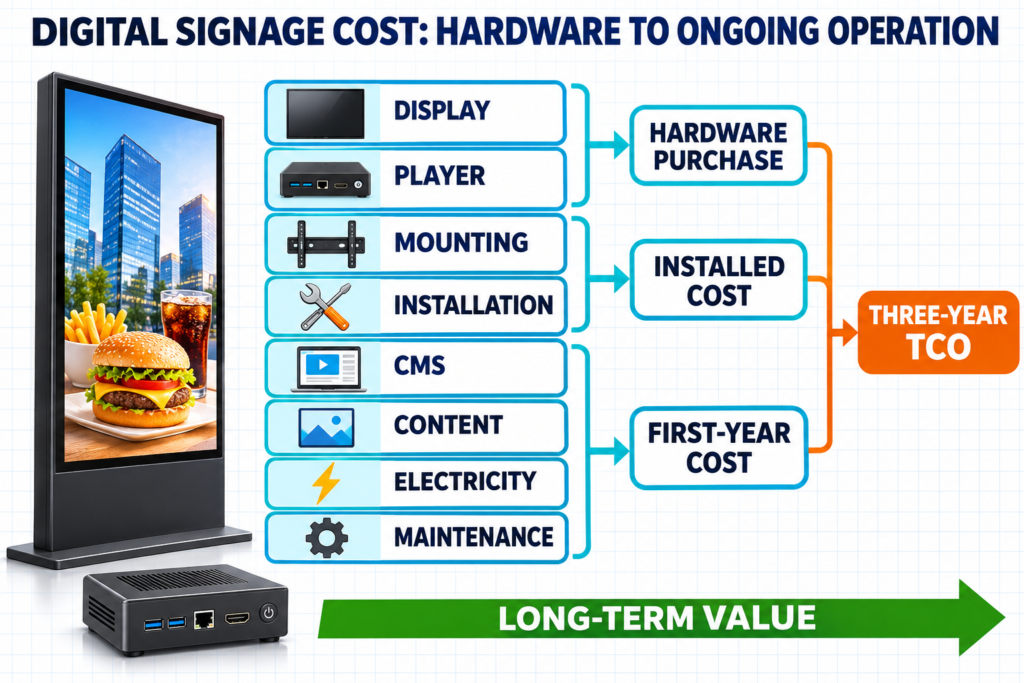
A typical indoor digital signage setup costs about $400 to $2,500 per screen upfront, plus $8 to $30 per screen per month for cloud software. A professionally installed commercial-display project often reaches $1,500 to $3,000 per screen before recurring costs. Outdoor displays, interactive kiosks, video walls, custom enclosures and system integrations require a project quotation because their engineering and site-work costs vary widely.
Those figures are planning ranges, not a substitute for a quotation. The final price depends on seven separate items: the display, media player, mount and cabling, installation, content-management software, content or integration work, and ongoing power and maintenance.
| Budget view | What it includes | Use it for |
|---|---|---|
| Display price | Screen or complete display terminal only | Comparing hardware quotations |
| Installed cost | Display, player, mount, cabling and site labor | Approving the initial project |
| First-year cost | Installed cost plus 12 months of software, support and content work | Comparing launch budgets |
| Three-year TCO | First-year cost plus later software, electricity, maintenance and replacement risk | Selecting the system with the best long-term value |
Digital Signage Cost by Project Type
Use the following table for an early feasibility budget. All figures are in USD and should be checked against current local labor, freight, tax and software prices.
| Project type | Practical planning range | Main assumptions |
|---|---|---|
| One-screen indoor pilot | $500–$1,500 for the first year | Basic display, simple player, standard mount, light installation and entry software |
| Standard indoor commercial network | $1,500–$3,000 upfront per screen | Commercial display, professional installation and networked management |
| Existing display converted to signage | About $100–$800 plus software and installation | Compatible screen already available; price depends mainly on player class |
| Interactive touch signage | Project quotation | Touch sensor, computer, enclosure, application and peripherals vary |
| Outdoor digital signage | Project quotation | High brightness, environmental protection, thermal design and site structure vary |
| Video wall or large-format LED | Project quotation | Multiple panels or modules, controller, structure, calibration and specialist labor |
The broad indoor ranges above align with the current market breakdown published by Yodeck. For a procurement decision, request a line-item quotation rather than applying one average to every location.
What Is Included in a Digital Signage System?
1. Commercial display
The display is usually the largest upfront item. Price changes with:
- Screen size and resolution
- Indoor, window-facing or outdoor use
- Required brightness and anti-glare treatment
- Daily operating hours and thermal design
- Portrait or landscape orientation
- Touch capability and protective glass
- Built-in Android or Windows hardware
- Enclosure, mounting and branding customization
A low-cost consumer TV may suit a short-hours pilot in a controlled indoor space. A commercial display is the safer comparison for long operating schedules, portrait installations, remote control, public locations and multi-site rollouts. Compare rated operating conditions, warranty terms and service access rather than the panel size alone.
For example, Lucky-XFC’s indoor digital signage reference configuration MZYHY55AZ combines a 55-inch 4K display, Android 11, Ethernet and Wi-Fi, portrait or landscape playback, tempered glass and wall-mounted, embedded or base installation. Its 300 cd/m² brightness is intended for ordinary indoor conditions. A window-facing or outdoor location needs a different brightness and enclosure specification.
2. Media player or built-in system
The player receives content from local storage or a CMS and sends it to the display. Current public pricing illustrates how capability changes cost: OptiSigns lists players at about $99.99, $349 and $799 for progressively more demanding playback and multi-screen use, while ScreenCloud lists its OS device at $199 in the United States.
A built-in Android system may remove the external-player purchase if the selected CMS application, security policy, video format and remote-management workflow are compatible. Confirm this before ordering. An integrated processor that can play a local video is not automatically compatible with every CMS or enterprise IT requirement.
3. Mount, cables and physical accessories
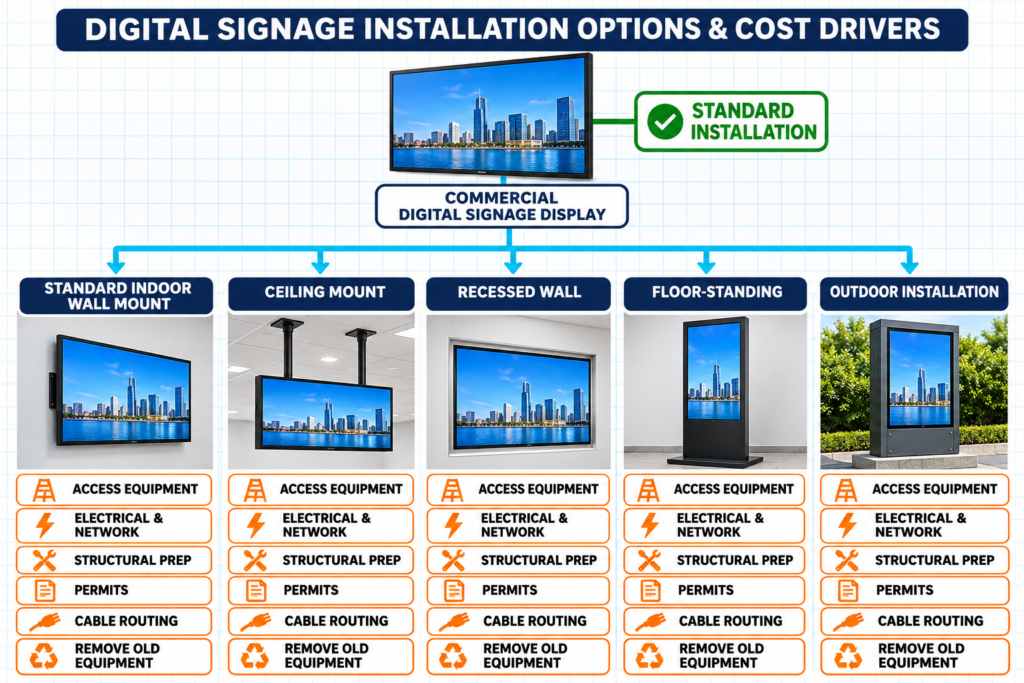
A basic wall mount may be a small line item. Cost rises with ceiling mounts, mobile stands, recessed installation, long cable runs, tamper resistance, hidden player brackets, video-wall structures or custom outdoor foundations. Confirm the VESA pattern, display weight, wall construction, access for service and local safety requirements.
The selected Lucky-XFC 55-inch reference model uses a 400 × 400 mm wall-mount pattern and weighs 24.42 kg without packaging. These model-specific details affect bracket selection and labor planning; do not apply them to another size without its drawing.
4. Installation and site preparation
Installation can include a site survey, mounting, electrical work, network cabling, player setup, device enrollment, screen calibration, testing and cleanup. A simple indoor wall installation is very different from a high-level mount, tiled wall, outdoor foundation or installation that needs a lift, overnight access or permits.
Ask the installer to separate these items:
- Site survey and project management
- Mounting labor and access equipment
- Electrical outlet and network work
- Mounts, cables, conduits and fixings
- Device configuration and CMS enrollment
- Travel, after-hours work and permits
- Removal or disposal of old equipment
5. Digital signage software
Cloud CMS pricing is normally charged per screen per month. Public annual-billing prices checked in November 2026 show why $8 to $30 per screen per month is a useful planning band for many standard projects:
These examples are not equivalent feature packages. Compare the functions your project actually needs: remote monitoring, offline playback, user permissions, approval workflows, SSO, API access, data integrations, proof of play, device management, storage, support and screen minimums. Also check whether the quoted rate assumes annual payment and whether players or add-ons are included.
6. Content and integration
Content cost may be close to zero when an internal team reuses existing artwork and templates. It can become a major project line when the system needs brand design, animation, menu feeds, live dashboards, wayfinding, multilingual content, accessibility work or an interactive application.
Separate initial content production from recurring updates. A screen with no defined owner, publishing schedule or approval process can become expensive to manage even when its software fee is low.
7. Electricity, support and maintenance
Calculate energy from the selected model rather than using a generic allowance:
Annual electricity cost = rated or measured kW × operating hours per day × operating days × local electricity rate
The MZYHY55AZ reference model lists 150 W typical power. At 12 hours per day and 365 days per year, the planning consumption is 657 kWh annually. At an illustrative rate of $0.15/kWh, that equals about $99 per year per screen. Actual consumption depends on brightness, content, operating schedule and device configuration.
Add a maintenance allowance for cleaning, damaged cables, failed players, on-site support and future hardware refresh. For a multi-location network, truck rolls and staff time can matter more than small differences in the monthly CMS rate.
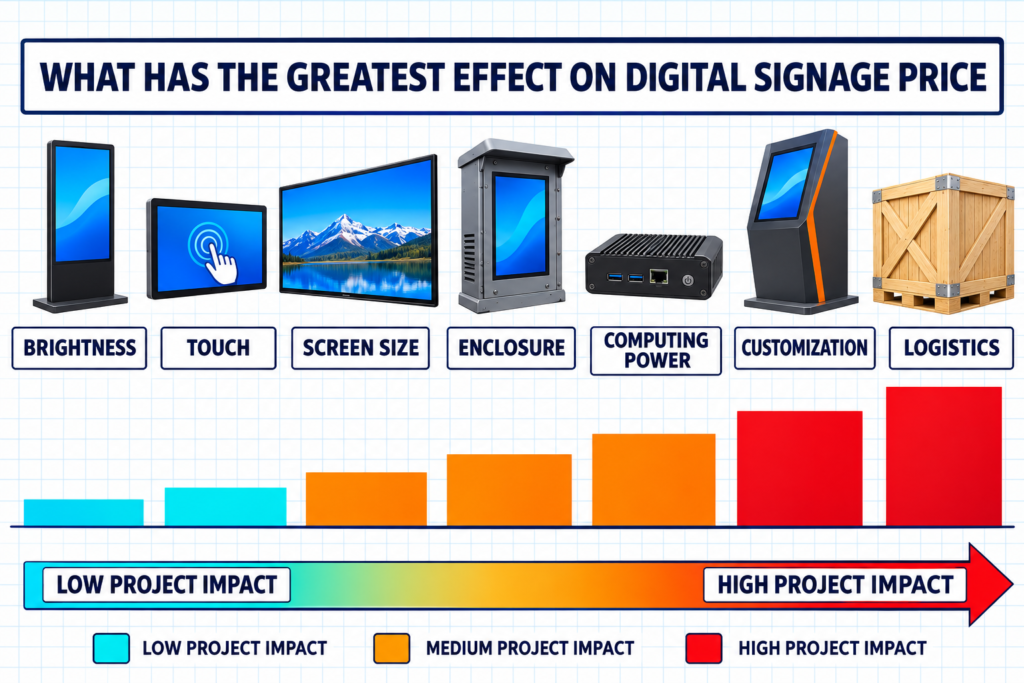
Which Specifications Increase Digital Signage Price Most?
Brightness and environment
Brightness must match ambient light. Standard indoor areas may need approximately 300–500 nits, while window-facing and full outdoor applications can require substantially more. Higher brightness also changes power consumption and thermal design. Do not pay for outdoor brightness in an ordinary corridor, and do not install a low-brightness indoor screen where direct sunlight will wash out the content.
The outdoor digital signage budget also needs weather-resistant structure, dust and water protection, temperature management, secure installation and service access. The required protection level and brightness should be written into the final specification rather than assumed from the word “outdoor.”
Touch and interactive functions
Touch adds more than a sensor. A complete interactive project may require protective glass, a controller, USB or serial touch communication, an Android or Windows computer, application development, accessibility review and peripheral integration. If users only need to view menus or promotions, non-touch signage is usually simpler and less expensive. If they need wayfinding, product search or self-service, evaluate interactive digital signage as a complete workflow.
Screen size and structure
Larger panels cost more to buy, pack, ship and install. They also require stronger brackets and more installation labor. A floor-standing unit includes an enclosure and base that a wall-mounted screen does not. Compare the complete installed structure, not only the diagonal size.
Operating system and performance
Static images and simple video playlists need less computing power than multi-zone 4K playback, live dashboards, touch applications or video walls. Specify the content format, number of zones, resolution, orientation and offline behavior before choosing processor, memory and storage.
Quantity, customization and logistics
Unit price can change with quantity, but the lowest factory unit price may not produce the lowest landed cost. Include sample validation, custom tooling or housing, certification, export packaging, freight, insurance, import duties, local tax and last-mile delivery. Large displays may need wooden protection or palletized shipping, and multi-site projects may require separate deliveries.
How to Calculate Three-Year Digital Signage TCO
Use one period and one scope for every vendor:
Three-year TCO = displays + players + mounts + installation + initial content and integration + 36 months of software + electricity + support and maintenance + expected replacement cost
The following worked example is a budgeting model, not a supplier quote. Replace every assumption with your actual quotation and local rate.
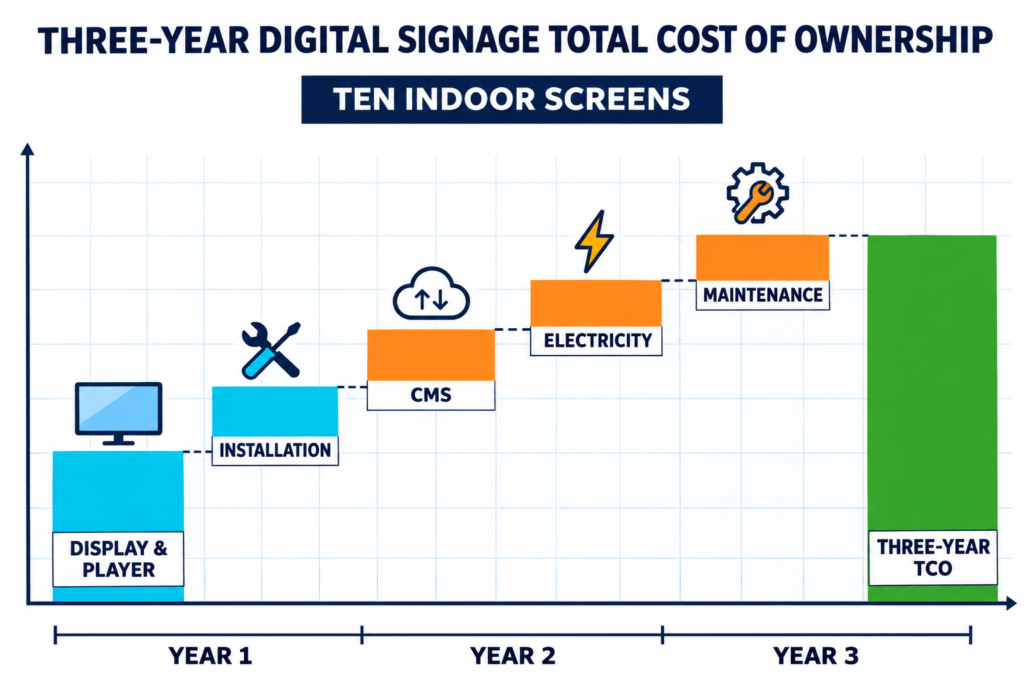
Example: ten 55-inch indoor screens
| Cost line | Example assumption | Three-year amount |
|---|---|---|
| Commercial displays | 10 × $1,200 | $12,000 |
| Installation and site materials | 10 × $300 | $3,000 |
| External players | Not required if the approved CMS runs on the integrated Android system | $0 |
| CMS | 10 × $12/month × 36 months | $4,320 |
| Electricity | 10 × 150 W × 12 h/day × 365 days × 3 years × $0.15/kWh | $2,957 |
| Maintenance reserve | 5% of display cost per year × 3 years | $1,800 |
| Illustrative three-year TCO | Excludes content, freight, tax and integration | $24,077 |
This example equals about $803 per screen per year over three years. If a CMS requires separate players, add their purchase, power and support costs. If the displays run 24 hours or use higher brightness, adjust the energy line. If content production or API integration is outsourced, add it as a separate work package.
How to Compare Digital Signage Quotations
Do not compare a display-only factory price with a local integrator’s installed-system price. Normalize every quotation with the same table.
| Question | What the quotation should state |
|---|---|
| Display | Model, panel size, resolution, brightness, orientation, duty cycle and warranty |
| System | Display-only, built-in Android/Windows or external player; CPU, memory and storage |
| Touch | Touch technology, number of touch points, glass, controller and supported OS |
| Software | CMS supplier, plan, billing period, screen count, storage, users and paid add-ons |
| Installation | Mounting, electrical work, cabling, configuration, travel, access equipment and permits |
| Environment | Indoor, window-facing, semi-outdoor or outdoor; temperature and protection requirements |
| Service | Remote support, on-site support, spare-unit plan, warranty process and response time |
| Logistics | Packaging, Incoterm, freight, insurance, tax, duties and final delivery point |
| Acceptance | Sample approval, drawings, inspection method and site acceptance test |
A low quotation may exclude the CMS, mount, player, installation or freight. A higher quotation may include items that otherwise appear later as change orders. Ask every bidder to mark exclusions explicitly.
How to Reduce Cost Without Weakening the Project
- Run a one- or two-screen pilot. Test content, network behavior, remote updates and real operating hours before a large rollout.
- Match brightness to the site. Survey ambient light instead of specifying the highest available brightness for every location.
- Use touch only where it changes the user journey. Passive promotions and menu boards often do not need interactivity.
- Standardize sizes and mounting. Fewer hardware variants simplify spare stock, content templates and installation.
- Check integrated Android compatibility. A suitable built-in system can avoid a separate player, but only after CMS and security testing.
- Schedule power. Timed on/off operation reduces energy use and unnecessary operating hours.
- Price the complete rollout. Negotiate hardware, spares, packaging and phased deliveries together rather than buying each location independently.
- Keep one TCO worksheet. Update it whenever a supplier changes a feature, subscription or installation assumption.

What Information Is Needed for an Accurate Quote?
Prepare the following before requesting prices:
- Installation country and final delivery address
- Indoor, window-facing, semi-outdoor or outdoor location
- Screen quantity, preferred size and viewing distance
- Portrait, landscape, wall-mounted, floor-standing or embedded installation
- Required brightness and daily operating hours
- Non-touch or touch, including the intended user task
- Display-only, Android, Windows or external-player architecture
- Content type, resolution, number of zones and CMS preference
- Network connection and remote-management requirements
- Enclosure, color, logo, interface and other customization
- Required certifications, inspection and acceptance method
- Pilot date, rollout schedule and target Incoterm
If the project is a restaurant menu network, review the digital menu board format separately. For a general product shortlist, start with digital signage screens and then narrow the configuration by environment and installation method.
Digital Signage Cost FAQ
How much does one digital signage screen cost?
A basic indoor working setup commonly falls between $400 and $2,500 upfront. A professionally installed commercial system may reach $1,500 to $3,000 per screen before recurring software and content costs. The display-only price is lower than the complete installed-system price.
How much does digital signage software cost?
Many standard cloud plans fall between $8 and $30 per screen per month. Free entry plans exist, while enterprise security, integrations, interactive functions and premium support can cost more. Confirm annual versus monthly billing and paid add-ons.
Can I use a normal TV for digital signage?
Yes, for a controlled indoor pilot with modest operating hours, compatible inputs and acceptable warranty terms. Use a commercial display when the project requires long operating schedules, portrait use, higher brightness, public-space durability, centralized control or consistent multi-site deployment.
Does digital signage need a media player?
It needs a playback system, but that system can be built into the display or connected externally. Confirm CMS compatibility, video performance, security, offline playback and remote management before removing the external player from the budget.
Why does outdoor digital signage cost more?
Outdoor systems may need higher brightness, weather and dust protection, thermal management, secure enclosures, stronger foundations and more complex installation. Each site should be engineered and quoted individually.
Is digital signage a one-time cost?
No. Hardware and installation are mainly upfront, while software, electricity, content updates, support and maintenance continue. A three-year TCO comparison gives a more reliable purchasing decision than the display price alone.
Request a Configuration-Based Digital Signage Quote
Digital signage pricing becomes accurate only after the environment, screen size, brightness, system, mounting, quantity and delivery scope are defined. Send Lucky-XFC your application, site conditions, quantity, preferred installation, operating system, touch requirement and reference drawings through the project inquiry form. The team can review the required display configuration and prepare a factory quotation for the hardware scope.