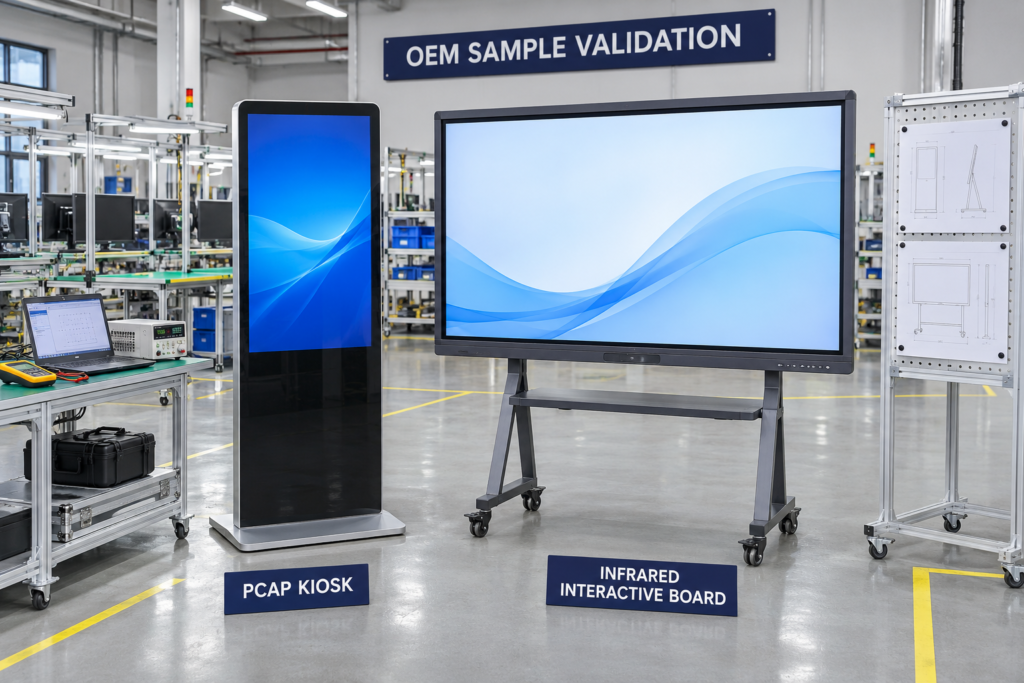

Choose a projected capacitive touch screen, usually called PCAP, when the project needs a flush glass front, precise finger interaction, smooth gestures, easy cleaning, and a compact or integrated product design. Choose an infrared touch screen, usually called IR touch, when the project needs a large interactive surface, broad glove or object compatibility, and a replaceable touch frame around the display.
Neither technology is the universal winner. A 21.5-inch industrial HMI, a 32-inch self-service kiosk, and an 86-inch classroom display have different users, enclosures, touch targets, cleaning routines, and service models. The correct decision depends on screen size, required touch points, input object, edge design, ambient conditions, controller, host operating system, order volume, and total ownership cost.
For B2B buyers, the most important rule is simple: compare complete production configurations rather than technology names. A well-tuned PCAP assembly can support gloves and controlled wet operation. A well-designed IR frame can deliver multi-user writing on a very large screen. The touchscreen manufacturer, OEM factory, display integrator, and buyer must still validate the exact sensor, controller, cover or protective glass, LCD, enclosure, firmware, cable, host, and application together.

Capacitive vs Infrared Touch Screen at a Glance
| Comparison factor | Projected capacitive touch screen | Infrared touch screen |
|---|---|---|
| Detection method | Measures changes in an electrical field across a transparent electrode matrix | Detects objects that interrupt horizontal and vertical infrared light beams |
| Typical input | Finger or compatible conductive stylus; gloves require a suitable design and tuning | Finger, glove, passive stylus, or another sufficiently opaque object |
| Front design | Can support a flush, edge-to-edge glass surface | Requires a perimeter frame that houses emitters and receivers |
| Multi-touch | Common, but the exact count depends on sensor and controller | Common on current large-format products, but the exact count depends on frame and controller |
| Best-known strengths | Fine finger control, gesture behavior, clean industrial design, sealed front integration | Large-screen scalability, broad input-object compatibility, touch without a conductive contact |
| Main engineering risks | Electrical noise, grounding, water behavior, glove sensitivity, glass stack, controller tuning | Dust or objects in the optical path, frame alignment, raised bezel, ambient infrared interference |
| Cleaning | Smooth glass can be easy to wipe; cleaner and liquid behavior must be approved | Display glass can be wiped, but the inner frame edge and optical channels also need attention |
| Common project fit | Kiosks, POS, industrial HMIs, medical interfaces, gaming terminals, embedded monitors | Interactive whiteboards, collaboration displays, information walls, large kiosks, large-format control rooms |
| Size economics | Often attractive for small and medium integrated displays; large custom PCAP remains possible | Often cost-effective for large interactive displays, subject to frame and glass construction |
| Replacement strategy | Sensor, glass, controller, and bonding construction may be supplied as a matched assembly | Frame can sometimes be serviced separately from the display glass, depending on product design |
This table describes common engineering tendencies, not fixed limits. Published products demonstrate wide overlap. ViewSonic lists 10-point PCAP and 10-point IR monitors in the same commercial touch range. SCHURTER lists customized PCAP designs with 1–10 finger multi-touch, while a 3M 22-inch PCAP model documents 20-finger input. On the IR side, PQ Labs publishes configurations from 2 to more than 50 touch points for one frame family. Touch count therefore belongs in the model specification, not in a general assumption about the technology.
How Does a Projected Capacitive Touch Screen Work?
A projected capacitive sensor contains transparent conductive electrodes arranged as a matrix. The touch controller scans that matrix and establishes a baseline. When a conductive finger approaches or contacts the glass, it changes the local electrical coupling. The controller measures the change, calculates X-Y coordinates, tracks movement, and sends touch data to the host.
The sensor normally sits behind cover glass or forms part of a laminated touch stack. This construction can provide a smooth front surface without a raised touch frame. The finished product may use perimeter bonding or full optical bonding between layers, depending on the optical, environmental, and cost requirements.
PCAP performance depends on more than the sensor pattern. Cover-glass thickness, printed border, adhesive, display noise, charger or power-supply noise, cable routing, metal enclosure, grounding, gloves, water, and controller firmware can change the usable signal. Microchip’s capacitive touch design guidance treats sensor construction, shielding, touch-cover effects, and mechanical and electrical requirements as one design problem.
Industrial PCAP is not limited to bare-finger smartphone behavior. SCHURTER’s PCAP touchscreen overview describes glove operation, water or salt-water resistance, application-specific controller tuning, and 1–10 finger multi-touch for its product range. These are engineered product capabilities, not automatic features of every capacitive touch screen.
How Does an Infrared Touch Screen Work?
An infrared touch frame places IR emitters and receivers along the edges of the display. Together they create an invisible grid slightly above the glass. When a finger, glove, or stylus blocks selected horizontal and vertical beams, the controller calculates the contact position from the interrupted paths.
Because the sensing occurs above the display, the input object does not need to be conductive and normally does not need to press on the surface. The protective glass itself does not have to contain the touch sensor. This is one reason IR technology scales effectively to interactive whiteboards and other large displays.
The optical frame creates its own design requirements. Its beam plane must remain clear and correctly aligned. A raised bezel is normally needed to house the emitter and receiver components. Dust, insects, debris, an enclosure lip, a cleaning cloth left on the edge, or strong external infrared energy can affect some designs. Current frames use different scanning patterns, filtering, algorithms, and mechanical structures, so environmental performance must be confirmed at model level.
ViewSonic’s touch technology white paper describes IR touch as beam-interruption technology and presents it as a multi-point option for large displays. It also notes that input can come from a finger, thick stylus, or gloved hand, while component design influences detection accuracy.

Touch Accuracy, Latency, and Gesture Performance
PCAP is commonly preferred when the interface contains small buttons, scrolling lists, pinch-to-zoom, rapid swipes, or frequent edge gestures. A dense electrode grid and a matched controller can track conductive contacts with a smartphone-like feel. A flush cover surface also allows the finger to move across the edge without crossing a raised frame.
IR touch can be accurate and responsive, especially in a large-screen interface designed around writing, annotation, large controls, and multi-user collaboration. It should not be described as inherently slow or imprecise. Published IR products vary substantially. For example, the PQ Labs G5S datasheet lists a 1.5 mm detectable object for selected configurations, sample rates up to 250 frames per second, and product options from 2 to 50+ touch points. Those figures apply to that product family and configuration, not every IR frame.
PCAP products also vary. A published 3M 22-inch PCAP display specification documents 20 touches and a 6 ms touch response for its specific implementation. Lucky-XFC’s current capacitive touchscreen monitor page lists 21.5-inch, 27-inch, and 43-inch open-frame starting models with documented 10-point PCAP. Lucky-XFC also has documented curved capacitive monitor configurations in 32-, 43-, 49-, and 55-inch sizes at 1920 × 1080. These are product examples rather than a technology-wide range.
When accuracy matters, ask both suppliers to use the same test:
- The same native display resolution and operating system
- The same UI, target sizes, and coordinate map
- A 5 × 5 grid with 25 center and edge test locations
- Tap, drag, slow-line, fast-line, two-finger, and required multi-user actions
- The actual glove, stylus, or finger input used by operators
- Cold start, warm operation, and the intended enclosure
- Recorded missed touches, false touches, line breaks, edge offset, and recovery behavior
This sample protocol is a practical RFQ starting point, not an international pass/fail standard. The buyer should set acceptance limits according to the application. A 5 mm offset that is tolerable on an 86-inch classroom canvas may be unacceptable on a compact HMI with tightly spaced controls.
Finger, Glove, and Stylus Compatibility
PCAP input compatibility
Standard PCAP expects a conductive contact. A bare finger is the normal reference. A passive capacitive stylus can work if its conductive tip produces enough signal. Thin or specially designed gloves may work on a suitable controller setting. Thick work gloves, insulated gloves, salt water, rain, and very thick cover glass require a project-specific sensor and tuning strategy.
Higher sensitivity is not a free upgrade. A controller tuned aggressively for thick gloves may become more sensitive to electrical noise, moisture, hovering objects, or unintended contact. The OEM manufacturer should validate the real glove by material, thickness, wet condition, and operator behavior instead of accepting “glove compatible” as a complete requirement.
Professional active-pen functions are separate. Pressure levels, hover, tilt, buttons, and reliable palm rejection normally require a compatible pen digitizer or a specially designed touch-and-pen system. Ten-point PCAP alone does not prove active-pen support.
IR input compatibility
IR detects beam interruption, so the object does not need to conduct electricity. A finger, gloved hand, or sufficiently large opaque stylus can work. This is useful in classrooms, meeting rooms, factories, exhibitions, and other environments where multiple users may bring different input objects.
The minimum detectable object remains model-specific. A very thin stylus may pass between the useful beam paths or produce unstable coordinates on one frame while working well on another. Palms, sleeves, erasers, and objects resting near the edge can also interrupt beams. For handwriting, specify minimum pen-tip diameter, number of simultaneous writers, palm behavior, eraser method, line continuity, and application software.
Front Surface, Bezel, and Display Quality
PCAP supports a clean, continuous front because the sensing layer is under the cover glass. This can help with kiosk styling, wipe-down cleaning, front sealing, and flush installation in a machine panel. The black printed border can hide bonding, sensor tails, and mechanical parts.
However, the full optical stack still affects the image. Cover glass, sensor material, adhesive, anti-glare treatment, air gaps, and reflections influence brightness, contrast, haze, and color. The display supplier should state whether brightness is measured at the LCD module or through the finished touch assembly.
IR does not need a transparent electrode film across the active image. The display can sit behind ordinary protective glass, and the optical touch function occurs above it. This can simplify glass replacement and preserve the display’s underlying optical path. The tradeoff is the perimeter frame. It adds bezel width and height above the glass and can collect debris at the inner edge.
For either technology, request a mechanical drawing with:
- Active display area and active touch area
- Complete outline dimensions and depth
- Bezel width on all four sides
- Height from glass to the top of the IR frame, where applicable
- Cover-glass thickness and edge treatment
- Sensor tail, controller, USB, and power locations
- Mounting holes, brackets, cutout, and cable clearance
- Landscape and portrait restrictions
An attractive rendering is not sufficient for cabinet design. The approved 2D drawing should control the enclosure opening and production inspection.
Screen Size and Multi-Touch Scalability
IR is strongly established in large-format collaboration because the emitter-receiver frame can be built around a large display without placing a sensor matrix across the full glass. ViewSonic’s published overview describes IR products from 20 to 150 inches as a technology-market range, and its 110-inch ViewBoard datasheet documents up to 40 touch points for that specific interactive display.
PCAP can also scale to large sizes. Large PCAP products exist well beyond 32 inches, including 43-, 55-, 65-, 75-, and 86-inch commercial examples. Large-format PCAP may require a more complex sensor, additional controller channels, careful grounding, uniform sensitivity, and a controlled glass or bonding process. Cost and serviceability can therefore change quickly with size and customization.
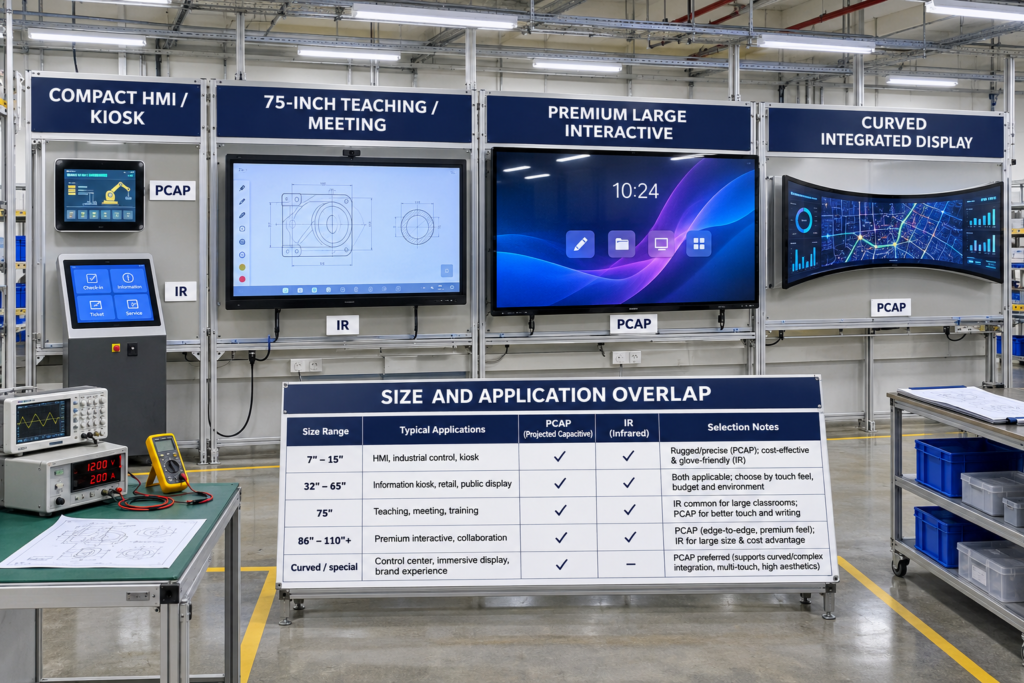
Do not choose by a simple rule such as “PCAP below 32 inches and IR above 32 inches.” Use an application boundary instead:
- For a compact HMI or kiosk, compare PCAP first when flush design and fine finger control matter.
- For a 65–110-inch teaching or meeting display, compare IR first when multiple writers, large-scale supply, and passive-object input matter.
- For a premium large display that needs edge-to-edge glass and high-end gesture behavior, request a large PCAP quotation as well as IR.
- For an unusual curved, shaped, or deeply integrated design, evaluate sensor geometry, controller availability, tooling, and service strategy before fixing the technology.
Dust, Water, Sunlight, and Electrical Noise
Dust and cleaning
A flush PCAP front can reduce crevices on the user-facing surface. It is often easier to wipe in a kiosk, medical cart, food-service terminal, or industrial panel. The glass, gasket, enclosure, and cable entry still determine ingress protection. PCAP technology by itself does not make a complete monitor waterproof.
IR frames depend on a clear optical path. Ordinary light dust may not stop a well-designed frame, but accumulated debris, insects, liquid residue, or a physical object along the edge can create blocked beams or false input. The maintenance plan should include the inner bezel and emitter-receiver openings, not only the center glass.
Water and wet operation
Water can change PCAP capacitance. Modern controllers can use water rejection, thresholds, scanning modes, and firmware logic, but the desired behavior must be defined. “Wet compatible” may mean the screen rejects droplets and ignores false input. It does not necessarily mean accurate finger operation through flowing water.
SCHURTER states that its PCAP products can be prepared for glove use and programmed for water rejection, while large amounts of water may temporarily disable touch in the described implementation. This is a useful example of why the buyer must specify desired behavior: ignore droplets, accept a gloved touch on a wet surface, lock during washdown, or continue full multi-touch.
IR does not measure capacitance, but water on or around the raised frame can still obstruct, reflect, or contaminate the optical path. A protected display enclosure and drainage strategy remain necessary. Ask for an assembled-system test rather than assuming that non-capacitive sensing equals waterproof operation.
Sunlight and ambient infrared energy
Strong sunlight contains infrared energy that can interfere with some IR frames. Current manufacturers use filtering and algorithms to improve performance, and some products publish outdoor or high-ambient-light specifications. The buyer should request the exact illumination limit, test orientation, test method, and sample result instead of relying on the word “sunlight resistant.”
PCAP does not use an optical beam grid, so external IR light does not interfere in the same way. Outdoor PCAP still has other challenges: display readability, solar heat, UV exposure, condensation, wet-touch behavior, electrical noise, and enclosure sealing. Touch technology and sunlight-readable LCD design are separate decisions.
Electrical noise and grounding
PCAP measures small electrical changes and can react to conducted or radiated noise from displays, power supplies, motors, chargers, radios, metal structures, and poor grounding. Controller frequency selection, sensor construction, shielding, cable routing, power design, and firmware filters can improve immunity. The final configuration should be tested inside the intended enclosure with every major electrical subsystem operating.
IR is generally less sensitive to capacitive electrical noise at the glass, but the controller and USB electronics still require stable power, grounding, electromagnetic compatibility, and host communication. Optical immunity does not eliminate normal electronic integration requirements.
Durability, Maintenance, and Service Cost
PCAP places the sensor behind a protective surface, so the user normally touches glass rather than a flexible film. The buyer can specify chemically strengthened glass, thickness, anti-glare treatment, printed border, and edge finishing. A damaged bonded assembly may require replacement of the glass-sensor unit or complete display, depending on construction.
IR can use robust protective glass because the glass is not the electrical sensing layer. A separate frame may be replaceable without replacing the LCD. On the other hand, the frame introduces exposed perimeter components, alignment requirements, and a cleaning zone. Physical damage to a corner or long frame section can stop touch even when the image remains normal.
Total ownership cost should include:
- Engineering sample and controller-tuning charges
- Custom glass, printing, bonding, frame, or tooling
- Display and touch-controller cost
- Assembly time and cable count
- Enclosure changes and gasket design
- Driver or firmware maintenance
- Cleaning time and acceptable cleaning chemicals
- Spare sensor, controller, frame, glass, and complete-unit inventory
- Field replacement time and recalibration procedure
- Panel or controller end-of-life risk
IR is often commercially attractive at large sizes, while PCAP often provides the cleaner integrated design. That pattern can reverse when a project needs special IR sunlight performance, unusual frame dimensions, large custom PCAP volume, premium bonded glass, or a field-replaceable architecture. Request quotations for equivalent scope and acceptance criteria.
Which Technology Fits Each B2B Application?
Industrial equipment and machine HMIs
Start with PCAP when the operator needs precise finger control, a flush panel, front sealing, easy cleaning, and modern multi-touch. Define the actual gloves, cover glass, moisture, grounding, EMC environment, and touch-target size. Lucky-XFC’s industrial touch screen coverage provides suitable starting structures for panel-mount, open-frame, and enclosed display discussions.
Consider IR when the HMI is unusually large, operators use varied non-conductive input objects, and the environment can keep the optical frame clean. A dusty machine area, heavy washdown, or an enclosure lip across the beam plane may make IR difficult even if glove compatibility looks attractive.
Self-service kiosks and retail terminals
PCAP is normally the first technology to evaluate for ordering, ticketing, check-in, payment, product lookup, and wayfinding. It supports a familiar finger-led interface and a continuous front. The kiosk manufacturer should test false touches, edge response, cleaning, vandal resistance, controller-host communication, and the final UI.
IR can make sense for a large information kiosk, an interactive shop window, or a retrofit in which a touch frame is added around an existing display. Confirm the bezel appearance, minimum object size, environmental light, and service access. Review the complete kiosk touch screen monitor structure rather than buying a frame independently of the enclosure.
Education and meeting-room displays
IR is a common starting point for 65-, 75-, 86-, and larger interactive boards. It supports multiple users, passive pens, and broad input compatibility. Buyers should compare simultaneous touch points with simultaneous writing points, because software or operating-system limits can differ from the frame’s raw touch count.
PCAP can provide a premium large-screen experience with a smooth glass front and strong gesture behavior. It may be preferred in executive meeting rooms, broadcast environments, design studios, or high-end collaborative tables. Compare the full cost, glass service strategy, pen system, palm rejection, and availability over the planned product lifecycle. Lucky-XFC’s interactive whiteboards page is the relevant project route for classroom and meeting-room sourcing.
Interactive walls, museums, and exhibitions
IR works well when a very large display needs touch from fingers, gloves, props, or passive styluses. The application should use touch targets appropriate to the viewing distance, and the installation must prevent visitors from resting objects on the frame.
PCAP suits premium interactive tables, close-view exhibits, and installations that need a flush visual surface. Complex shapes, thick decorative glass, nearby metal, and long cable runs require early engineering review. For large installations, compare large touch screen monitor formats with the mounting and service conditions already defined.
Representative Buyer Scenarios
The following scenarios are engineering examples for selection and RFQ planning. They are not named Lucky-XFC customer records or guaranteed production specifications.
German packaging-equipment manufacturer: 21.5-inch HMI
A German machine builder needs a 21.5-inch open-frame monitor for a packaging line. The planning inputs are 1920 × 1080 resolution, 10-point touch, 500-nit-class display, 3 mm cover-glass concept, nitrile-glove input, 16/7 operation, and a front-sealing target defined by the finished control cabinet. The pilot is 10 units with a forecast of 250–400 units per year.
PCAP is the stronger starting point because the interface uses small recipe buttons, drag controls, and a flush front that operators clean daily. The sample plan should test the actual glove, cabinet grounding, motor and inverter noise, wet wiping, edge targets, and USB touch recovery after power cycling. IR would offer easy glove detection, but the optical frame and debris path create unnecessary complexity for this compact sealed panel.
United Kingdom school group: 86-inch classroom boards
A UK education integrator is specifying 30 interactive boards at 86 inches. The functional target is 4K display output, at least 20 simultaneous touch points, four simultaneous writers in the selected annotation software, passive pens with replaceable tips, 8–10 operating hours per school day, and a five-year spare-parts plan.
IR is the logical first quotation because of the screen size, passive-object input, and multi-user writing requirement. The sample acceptance should include corner writing, two- and four-user line continuity, palm behavior, Windows and Android compatibility, frame cleaning, and pen-tip detection. A large PCAP alternative may provide a more continuous glass appearance, but the buyer should compare complete-unit price, replacement glass, shipping risk, and field-service time.
UAE retail wayfinding kiosk: 32-inch portrait display
A UAE retail contractor needs 60 portrait kiosks for indoor shopping centers. The planning inputs are a 32-inch 4K or Full HD display path, 10-point touch, 700–1000-nit brightness evaluation under bright interior lighting, 24/7 system availability, Android or Windows host options, and a smooth front suitable for frequent cleaning.
PCAP is the preferred starting point because the interface relies on taps, swipes, zooming a map, and small tenant-list controls. The project should validate the actual cover glass, portrait coordinate mapping, air-conditioning shutdown temperature, cleaning chemical, network recovery, and mounting pressure. Brightness, thermal design, and touch behavior must be tested as one kiosk, not approved through separate LCD and sensor samples.
United States museum wall: 75-inch multi-user exhibit
A U.S. exhibit integrator is comparing technologies for 12 wall-mounted interactive displays. The target is a 75-inch 4K canvas, 20 simultaneous touch points, two active visitor groups, passive object input, 12 hours of daily operation, and a service design that allows the touch system to be replaced without removing the LCD.
IR deserves the first engineering sample because the large size and serviceable frame match the project. The exhibit software should be tested with sleeves, palms, children leaning near the lower edge, and props that could block beams. If the architectural team requires uninterrupted edge-to-edge glass, the integrator should also price large PCAP and compare its bonding, shipping, controller, and replacement strategy.

What Should an OEM Sample Test Include?
A touchscreen supplier should provide more than an isolated demonstration. Test the production-intent display, touch system, controller, enclosure, cable, power supply, host, operating system, driver, and application.
Functional test
- Power-on recognition and USB enumeration
- Correct touch mapping in landscape and portrait
- Single tap, double tap, press-and-hold, drag, swipe, and required gestures
- Required simultaneous touch and writing points
- Edge, corner, and center response using a defined grid
- Intended finger, glove, passive stylus, or active pen
- Host sleep, wake, restart, and unexpected power-loss recovery
- Signal loss and reconnection behavior
Environmental and integration test
- Touch operation with every major electrical subsystem active
- Grounding and cable arrangement in the intended metal enclosure
- Required dry, damp, droplet, or controlled wet-use condition
- Planned cleaning cloth and chemical
- Expected ambient-light range and installation orientation
- Dust or debris exposure relevant to an IR frame
- Maximum expected internal temperature after thermal stabilization
- Operation near the display edge and enclosure bezel
Quantified sample report
A practical report can record 25 grid locations, 100 repeated taps at critical controls, continuous line drawing across every edge, the required number of simultaneous contacts, and results for each approved glove or stylus. The numbers are example test coverage, not universal standards. The buyer and manufacturer should agree on the actual sample size, error tolerance, test duration, environmental condition, and acceptable failure count before the batch order.
For custom projects, retain the approved sample, touch-controller firmware identity, driver version, glass drawing, sensor drawing, cable specification, and host configuration. A change to any one of these can alter touch behavior.
Questions to Ask a Touch Screen Manufacturer
- Is the proposed technology PCAP or IR, and why does it fit the specific application?
- What are the exact touch points, writing points, minimum input object, and supported gestures?
- What finger, glove, passive stylus, or active pen has been tested?
- What are the active touch area, edge exclusion, bezel width, frame height, and complete dimensions?
- Which cover or protective glass, thickness, treatment, printing, and bonding method are included?
- How does the configuration behave with water, cleaning liquid, dust, strong light, and electrical noise?
- Which touch controller, firmware revision, interface, driver, and operating systems are approved?
- Does touch use USB, serial, or another data path, and is video carried separately?
- Can the factory provide an open-frame monitor, panel-mount assembly, enclosed monitor, or complete interactive terminal?
- What engineering charge, tooling, sample quantity, MOQ, and annual forecast assumptions control the quotation?
- What inspection, traceability, change notice, warranty return, repair, and spare-parts plan applies?
- Which documents and test reports belong to the exact quoted configuration and destination market?
Lucky-XFC’s touch screen controller guidance explains why the sensor, controller, host interface, cover glass, display electronics, and installation environment must be matched. The company’s scope is touch-display integration rather than bare controller-chip manufacturing. This is particularly important in a PCAP-versus-IR decision because the controller architecture differs completely between the two technologies.
Frequently Asked Questions
Is infrared touch better than capacitive touch?
Infrared is often better for very large displays, passive stylus use, varied gloves, and multi-user collaboration. PCAP is often better for flush glass, precise finger interaction, compact integration, frequent cleaning, and modern gestures. The application determines the better choice.
Is capacitive touch more accurate than infrared?
PCAP often provides excellent fine-target and gesture behavior, but accuracy is not determined by technology name alone. IR frame resolution, scan rate, algorithms, object size, glass, controller, host, and application all matter. Compare production samples using the same UI and test grid.
Can infrared touch work with gloves?
Usually yes, because the glove only needs to interrupt the light grid. Confirm the minimum detectable object, glove shape, simultaneous contacts, and edge behavior on the exact IR frame.
Can a capacitive screen work with work gloves?
It can when the sensor and controller are designed and tuned for the specified glove. Test the real glove when dry, wet, and contaminated as applicable. Do not assume that a consumer PCAP panel will recognize every insulated glove.
Which technology is easier to clean?
A flush PCAP glass front is usually easier to wipe because it has no touch-frame channel around the active area. IR protective glass is also cleanable, but the raised frame and optical openings need a maintenance procedure.
Which technology supports more touch points?
Neither technology has one universal number. Commercial examples include 10- and 20-point PCAP products and IR frames with 10, 20, 40, or more reported points. Check raw touch points, simultaneous writing points, driver requirements, and software limits separately.
Does IR touch reduce image brightness?
The IR sensing grid is above the glass and does not require a transparent electrode sensor over the image. Protective glass, anti-glare treatment, air gaps, and the display itself can still affect visible image quality.
Is PCAP always bezel-free?
PCAP can support a flush edge-to-edge front, but the finished monitor may still have a printed border, metal housing, or visible mechanical bezel. Request the actual drawing and sample.
Which technology is cheaper?
IR is often cost-effective for large displays, while PCAP is widely available for compact and medium screens. Final cost depends on size, touch count, glass, bonding, frame, controller, enclosure, quantity, tooling, testing, shipping, and field service. Compare equivalent complete configurations.
Select by Application, Then Approve the Complete System
Choose PCAP when the project prioritizes precise finger interaction, a flush glass front, gesture control, frequent cleaning, and integrated industrial design. Choose IR when the project prioritizes a large touch area, multiple users, passive objects, glove flexibility, and a serviceable perimeter touch frame.
Do not release a batch order from a generic technology comparison. Approve the exact LCD, touch sensor or IR frame, controller, glass, firmware, driver, enclosure, cable, host, operating system, and application through a production-intent sample.
Send the display size, required touch and writing points, input object, glove or stylus, cover-glass requirement, mounting drawing, host system, environment, quantity, destination market, and expected service life through the Lucky-XFC project inquiry page. The touch-display manufacturer can compare available PCAP and applicable large-format interaction paths, define the OEM/ODM sample scope, and prepare a configuration-specific quotation.