
A commercial gaming kiosk is a self-service terminal built for a public gaming, entertainment, wagering, redemption, or player-service workflow. It usually combines a touchscreen, computing system, enclosure, network connection, and application-specific peripherals. The exact meaning depends on where the kiosk is installed and what users are allowed to do.
In a family entertainment center, a gaming kiosk may let visitors select games, load credits, or redeem points. In a retail store, it may demonstrate game content. In a casino or betting venue, it may support player services, ticket redemption, account access, or regulated wagering. These systems can look similar from the outside, but their software, security, payment, and approval requirements are not interchangeable.
What Is a Commercial Gaming Kiosk?
The term describes the complete terminal, not just its screen. A typical kiosk includes the user interface, processor, enclosure, power system, connectivity, and any peripherals needed to complete the intended transaction or interaction.
The kiosk can perform one or more functions:
- Present games, promotions, rules, or account information
- Let users select a game or entertainment experience
- Read a membership card, QR code, ticket, or identity document
- Accept an approved payment method or load stored value
- Print receipts, tickets, or redemption vouchers
- Connect to a venue management, loyalty, wagering, or content system
- Provide staff-assisted or unattended player services
A commercial gaming kiosk is different from a display-only product. A gaming touchscreen monitor contains the display, touch sensor, touch controller, and display electronics, but normally relies on an external host. A complete kiosk adds the computer, enclosure, software environment, peripherals, security features, and system integration.
It is also different from a slot machine. A slot or electronic gaming device runs a regulated game and is evaluated as a gaming device where applicable. A kiosk may instead support account, payment, ticket, information, or wagering workflows. Some jurisdictions allow a kiosk to perform regulated gaming functions, but the hardware category and approval route must be established before development.
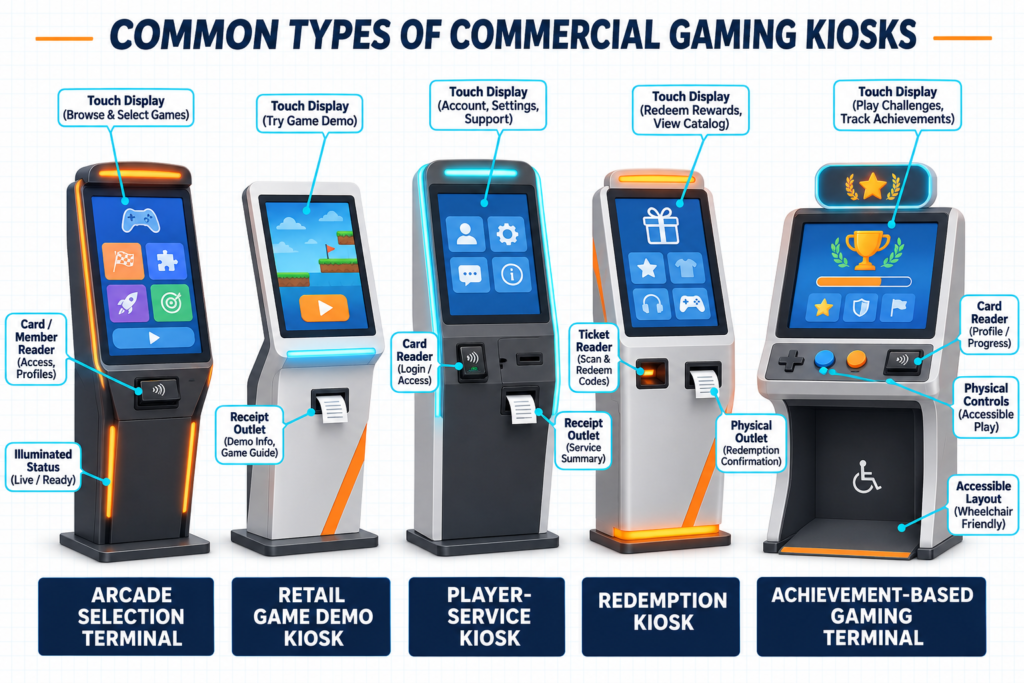
Main Types of Commercial Gaming Kiosks
Arcade and entertainment kiosks
These terminals support non-wagering games, attraction access, game selection, credit loading, session control, or venue information. They may be deployed in arcades, family entertainment centers, cinemas, esports venues, museums, or branded experience spaces.
The hardware may use a flat or curved touchscreen, speakers, card or wristband reader, QR scanner, receipt printer, and local or cloud-connected computer. The user interface usually prioritizes quick onboarding, durable controls, and clear recovery if a session is interrupted.
Retail game demonstration kiosks
Retail demonstration kiosks allow customers to preview software, browse a game catalog, watch trailers, or interact with a limited demo. They are commonly designed around brand presentation, unattended reset, content control, and resistance to accidental changes.
These systems need secure peripheral access, automatic application launch, restricted operating-system access, and a service procedure for staff. Payment hardware is usually unnecessary unless the kiosk also supports checkout or account loading.
Player-service kiosks
A player-service kiosk may support membership registration, card replacement, loyalty balances, promotional offers, account information, or venue navigation. It can include an ID reader, camera, card dispenser, barcode scanner, or printer according to the approved workflow.
The design must protect personal data and prevent users from reaching administrative functions. Privacy screens, controlled document handling, secure service doors, and clear timeout behavior may be important where personal accounts are involved.
Redemption and ticket kiosks
Redemption kiosks read tickets, vouchers, barcodes, or stored-value credentials and then issue a receipt, updated card value, voucher, or other approved output. They may be used in amusement venues or regulated gaming environments.
The bill validator, ticket reader, printer, cash-handling module, and back-end validation protocol are specialist components. Their physical mounting, service access, communications, and approval status should be defined early rather than added after the enclosure is finished.
Self-service wagering terminals
Self-service wagering terminals let an eligible user select an event, place an authorized wager, fund the transaction through an approved method, and receive confirmation or a ticket. This category operates under jurisdiction-specific gaming rules.
Gaming Laboratories International lists GLI-20 for kiosks and GLI-33 for event wagering systems among its technical standards. The applicable regulator and test laboratory determine which standards, submissions, logs, security controls, peripherals, and change procedures apply to the actual deployment.
Casino cashier and cashless-service kiosks
These kiosks can support ticket redemption, account funding, cashless wallet access, or other services authorized by the venue and regulator. They may interact with player accounts, validation systems, cashless systems, or monitoring infrastructure.
The kiosk enclosure is only one part of this system. The payment and gaming protocols, cryptographic controls, audit logs, host systems, and operational procedures are part of the approved solution.
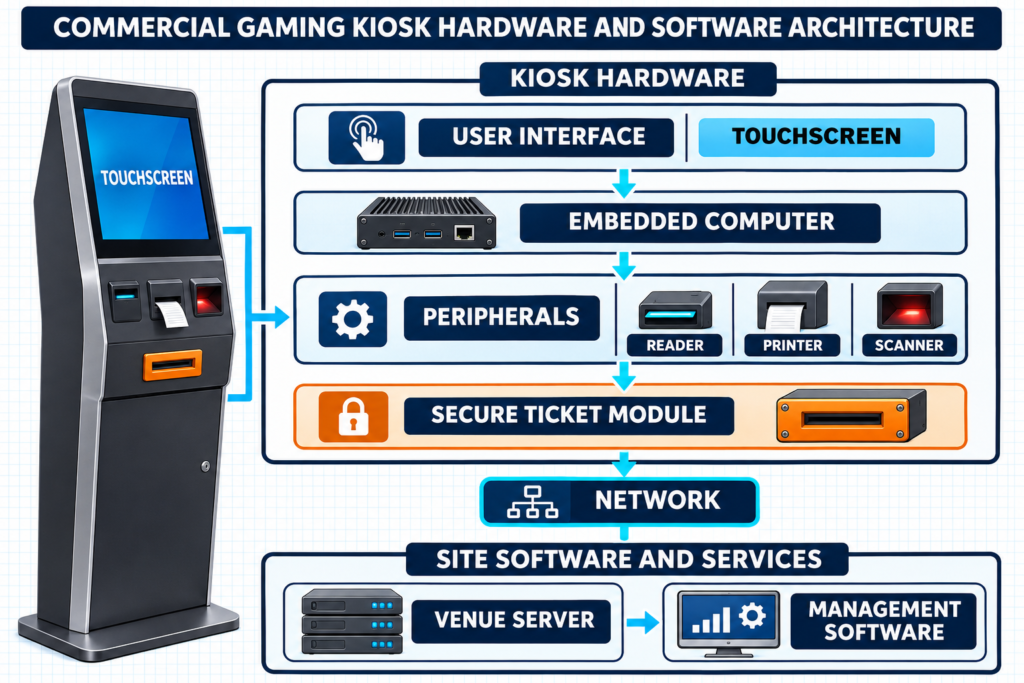
Core Components of a Commercial Gaming Kiosk
Touch display
The display presents the application and often serves as the primary control surface. Important parameters include active area, resolution, brightness, viewing angle, orientation, touch technology, cover glass, and the way the monitor mounts inside the enclosure.
Projected capacitive touch is commonly selected for responsive multi-touch interfaces. An applicable resistive configuration may suit projects that require pressure input or a specific glove and stylus behavior. The touch sensor, controller, cover glass, operating system, and application should be tested as one input system.
Computing platform
The computer runs the kiosk application and communicates with peripherals and back-end services. A system may use an embedded PC, industrial computer, Android platform, or a touchscreen computer that combines display, touch, and computing hardware.
Processor performance should be matched to the application. A simple account or redemption interface has different graphics and storage requirements from a content-rich entertainment terminal. The platform should also support the required operating-system lifecycle, remote management method, device drivers, and security controls.
Enclosure and mounting structure
The enclosure positions the screen and peripherals, protects internal components, supports ventilation, and allows authorized servicing. Commercial formats include floor-standing, wall-mounted, countertop, desktop, and cabinet-integrated designs.
The front panel should be based on the approved display drawing, not nominal screen size alone. Confirm the active display area, outer dimensions, cutout, bezel coverage, installation depth, mounting points, connector positions, and cable bend radius.
User-input and identification peripherals
Depending on the workflow, a kiosk can include:
- Barcode or QR scanner
- RFID or NFC reader
- Membership or magnetic card reader
- ID document reader
- Camera
- Physical buttons or illuminated controls
- Keypad or approved PIN-entry device
- Supported accessibility controls
Each peripheral needs a defined communications interface, power source, mounting position, driver, software protocol, and replacement method.
Payment, ticketing, and issuing devices
Payment card terminals, bill acceptors, coin modules, ticket readers, thermal printers, voucher printers, and card dispensers add mechanical and regulatory complexity. The cabinet needs room for media paths, cash boxes, paper rolls, anti-tamper features, and staff access without exposing unrelated electronics.
For card payments, use an architecture approved by the acquirer and payment partners. The PCI Security Standards Council explains that PCI PTS Point-of-Interaction covers device categories including unattended payment terminals and secure components. A listed payment terminal does not by itself make the entire kiosk or merchant environment compliant.
Audio and feedback
Speakers, headphone connections, status lights, haptic feedback, and illuminated controls help users understand system state. Audio design should consider the venue noise level, privacy, content licensing, and accessibility requirements.
Network and back-end connection
A commercial kiosk may use Ethernet, Wi-Fi, or cellular connectivity according to the project. The network supports content updates, account services, peripheral authorization, transaction processing, logging, diagnostics, and remote maintenance.
Network design should define what happens when the connection is slow or unavailable. The application needs a safe state for interrupted sessions, duplicate requests, failed ticket validation, incomplete payments, and delayed synchronization.
Power, cooling, and service access
The power system must support the monitor, computer, peripherals, lighting, fans, and short-duration peaks from printers or payment devices. Use a documented power budget and approved distribution components.
Thermal design should be evaluated with the enclosure closed and the kiosk operating under its expected load. Air intake, exhaust, filters, fan replacement, heat from the display, and nearby walls or machines all affect internal temperature. Service doors should let technicians replace common wear items without removing the entire kiosk.
Display Formats for Gaming Kiosks
Flat enclosed touch monitor
A finished metal-housed monitor suits a conventional cabinet, external arm, VESA mount, or secondary operator screen. It can simplify replacement when the complete monitor remains accessible as a unit.
Open-frame touch monitor
An open-frame touch monitor mounts behind a custom fascia. This gives the kiosk designer control over the visible bezel and cabinet styling. The design must account for cutout tolerance, bracket position, rear depth, cable exit, ventilation, and service removal.
Curved gaming display
C-shaped and J-shaped displays can create a distinctive cabinet profile or continuous interactive surface. The curve, active area, touch mapping, content layout, and mounting structure must follow the selected display rather than a generic curve description.
Multi-screen arrangement
A kiosk can use a primary touch display, an upper promotional screen, a secondary control screen, or a staff-facing service display. Each screen should have a defined role, orientation, resolution, signal, power input, and touch requirement.
The application must map touch input to the correct screen. Multi-screen startup order and recovery should also be tested after power interruption, computer restart, or display replacement.
How a Commercial Gaming Kiosk Works
A typical user session follows a controlled sequence:
- Idle state: The kiosk displays an attract loop, instructions, or approved promotional content.
- Session start: The user touches the screen, scans a credential, or selects a service.
- Identification or eligibility: The system reads an account, ticket, membership card, or identity document when the workflow requires it.
- Selection: The user chooses a game, service, event, payment amount, or redemption option.
- Authorization: The kiosk exchanges data with the local or remote system and receives an approved response.
- Transaction or activity: The kiosk launches content, accepts an authorized payment, updates an account, validates a ticket, or completes another permitted action.
- Output: The system displays confirmation and may print or issue a ticket, receipt, card, or voucher.
- Session close: Personal data is cleared from the screen, the system logs the event, and the kiosk returns to its idle state.
The application should define recovery at every stage. A user must not be charged twice because a screen froze, receive an invalid ticket after a printer fault, or inherit information from the previous session.
Gaming Kiosk, Slot Machine, and Arcade Cabinet Differences
| Hardware category | Primary purpose | Typical user interaction | Common system boundary |
|---|---|---|---|
| Commercial gaming kiosk | Self-service selection, account, wagering, redemption, or entertainment workflow | Touchscreen plus project-specific peripherals | Complete terminal connected to a service or gaming platform |
| Slot or electronic gaming device | Run an approved game with defined gaming behavior | Buttons, touchscreen, reels, displays, or control deck | Gaming device hardware and software evaluated under applicable rules |
| Arcade cabinet | Deliver a non-wagering entertainment game | Buttons, joystick, pedals, guns, touch, or mixed controls | Game computer, cabinet, display, controls, and credit system |
| Gaming touchscreen monitor | Display content and send touch coordinates | Touchscreen | Display component connected to an external host |
| General self-service kiosk | Complete a non-gaming service transaction | Touch plus scanner, printer, payment, or identification devices | Kiosk hardware, application, and service platform |
Lucky-XFC’s slot machine display range concerns monitor and touch-display hardware for gaming cabinets. It should not be treated as a complete slot machine, wagering platform, or gaming approval.
Software and System Responsibilities
The hardware manufacturer, software developer, gaming platform provider, payment integrator, venue operator, and regulator have different responsibilities. Define these boundaries before the prototype stage.
The software scope may include:
- Kiosk user interface and session management
- Peripheral drivers and device-control services
- Venue or player-account integration
- Content and game selection
- Transaction, ticket, and redemption logic
- Remote monitoring and software deployment
- Security updates and access control
- Event, audit, fault, and maintenance logs
The kiosk hardware should expose the required interfaces and support the agreed operating environment. It does not automatically provide the game mathematics, wagering engine, payment acquiring, player-account platform, or jurisdictional approval.
Security and Serviceability
Commercial gaming kiosks operate in public spaces and may handle valuable credentials, tickets, funds, or personal data. Security starts with the physical cabinet and continues through the software and network.
Useful hardware measures can include controlled service doors, protected fasteners, lockable cash or ticket compartments, cable retention, intrusion sensing, restricted USB access, and separate access zones for high-risk peripherals. The exact controls depend on the kiosk function and regulatory plan.
Software measures can include authenticated maintenance access, least-privilege accounts, application lockdown, signed updates, encrypted communications, secure boot where applicable, log protection, timeout controls, and remote-disable procedures. Security settings should survive restart and component replacement.
Serviceability is equally important. Paper rolls, ticket stock, filters, fans, scanners, and payment modules may need routine attention. Put common service items within safe reach and define how technicians work without exposing cash, user data, or unrelated system components.
Compliance and Accessibility
The compliance plan depends on what the kiosk does and where it is installed.
For regulated gaming projects, GLI’s current standards page lists standards for gaming devices, kiosks, cashless systems, interactive gaming, player user interfaces, and event wagering. GLI also notes that each jurisdiction sets its own requirements, although many use GLI standards as a starting point. The responsible regulator and laboratory should classify the terminal and approve the submission path.
Electrical safety, electromagnetic compatibility, radio functions, environmental restrictions, and local market requirements may apply to the kiosk or its subassemblies. IEC 62368-1 is one current safety standard for audio/video and information and communication technology equipment, but the exact product scope and national adoption should be established for the destination market.
Accessibility should be considered at the enclosure, hardware, and software levels. The U.S. Access Board identifies barriers in self-service transaction machines and kiosks, including issues affecting people with visual, hearing, physical, or dexterity limitations. Screen height, reach, control spacing, text size, contrast, audio alternatives, privacy, timeout behavior, and wheelchair approach should be included in the design review according to the applicable rules.
Development and Validation Process
1. Define the exact kiosk function
Write the complete user workflow, including identification, payment, game or service selection, output, cancellation, error handling, and session close. State whether the terminal performs regulated gaming, supports gaming services, or provides non-wagering entertainment.
2. Assign system responsibilities
Identify who supplies the enclosure, display, computer, operating system, application, game or wagering platform, payment equipment, peripherals, network, and certification support.
3. Freeze the display and enclosure architecture
Choose flat, open-frame, curved, or multi-screen hardware. Approve the screen drawing, user height, peripheral layout, airflow, cable paths, and service zones before releasing sheet metal.
4. Build a representative prototype
Use the intended computer, controller boards, peripherals, cables, power distribution, and enclosure. A display-only bench test cannot reveal printer loading, thermal buildup, touch mapping, service access, or network recovery problems.
5. Run functional and fault tests
Test normal transactions and failures such as network loss, printer out of paper, invalid ticket, peripheral disconnection, power interruption, application crash, and unsuccessful payment. Confirm that every failure leaves the user and system in a controlled state.
6. Complete compliance review
Submit the correct hardware, software, drawings, component lists, and change records to the responsible test lab or authority when required. Evaluate changes to the display, computer, payment module, firmware, or cabinet against the approved configuration.
7. Approve a golden sample
Record part numbers, firmware, operating-system image, application build, cable set, peripheral configuration, labels, locks, and packaging. Production inspection and future replacement should use that approved configuration.
Information to Include in a Commercial Gaming Kiosk RFQ
Provide enough detail for the hardware supplier and integrator to evaluate the same system.
- Kiosk function and installation venue
- Country, region, and regulatory category
- Wagering, non-wagering, player-service, or redemption scope
- Screen size, orientation, shape, resolution, and touch requirements
- Floor-standing, wall-mounted, countertop, or cabinet-integrated structure
- Computer platform and operating system
- Application owner and software responsibilities
- Required scanners, readers, printers, payment, ticket, or cash modules
- Network connection and remote-management method
- Audio, camera, lighting, and accessibility features
- Input voltage, power budget, cooling, and operating environment
- Security locks, service doors, and access zones
- Prototype quantity, rollout quantity, and target schedule
- Required testing, documentation, and destination-market compliance
Avoid asking for a “gaming kiosk” quotation without defining its workflow. A game-demo terminal with one touchscreen and a small PC has little in common with a regulated wagering kiosk containing identity, payment, ticketing, cash-handling, and audit functions.
Lucky-XFC Hardware Options for Gaming Kiosk Projects
Lucky-XFC supports touch-display and kiosk-hardware integration for commercial equipment projects. Relevant starting points include flat and curved gaming displays, kiosk touch screen monitors, open-frame monitors, touchscreen computers, and configurable self-service kiosk enclosures.
The current gaming display scope includes flat, open-frame, C-type, J-type, and project-specific multi-screen formats. Documented starting ranges include 21.5 to 43-inch flat touch displays and 32 to 55-inch curved families. The selected model sheet and cabinet drawing should define the actual screen, curve, touch controller, interfaces, power, mounting, and dimensions.
For complete gaming projects, Lucky-XFC’s role should be defined around the approved hardware scope. Game software, wagering systems, payment acquiring, gaming mathematics, jurisdictional submissions, and operating licenses remain with the responsible technology providers, laboratories, operators, and authorities.

Frequently Asked Questions
Is a commercial gaming kiosk the same as a slot machine?
No. A slot machine is a gaming device that runs an approved game. A gaming kiosk may support entertainment, game selection, player accounts, wagering, tickets, redemption, or other services. Its regulatory category depends on its actual functions and jurisdiction.
Can a commercial gaming kiosk use a standard touchscreen monitor?
It can use an enclosed monitor when the cabinet and service design suit that format. A custom fascia often uses an open-frame monitor. The screen must match the cutout, mounting, touch interface, host output, power system, and operating environment.
Does the kiosk need an internal computer?
Most complete kiosks need a computing platform, but it can be an embedded computer, industrial PC, Android board, touchscreen all-in-one, or external host. The correct architecture depends on graphics, peripherals, software, service, and certification requirements.
Which peripherals are common in gaming kiosks?
Common options include barcode or QR scanners, RFID or membership-card readers, ID readers, cameras, receipt or ticket printers, payment terminals, bill validators, card dispensers, speakers, and status lights. Include only the peripherals required by the approved workflow.
Can one kiosk support both games and payment?
Yes, when the application, payment architecture, hardware, acquirer, security controls, and applicable gaming rules permit it. Payment-terminal approval does not automatically cover the full kiosk or gaming system.
What display is best for a gaming kiosk?
There is no single best format. Flat enclosed monitors suit conventional structures, open-frame monitors suit custom fascias, curved displays suit shaped cabinets, and multi-screen arrangements suit separate game, control, and promotional roles.
Who is responsible for gaming approval?
The responsibility is shared according to the project and jurisdiction. The gaming platform provider, software owner, hardware suppliers, test laboratory, operator, and regulator may each have defined submissions and controls. Establish this responsibility matrix before prototype approval.
What should be tested before mass production?
Test display and touch behavior, peripherals, payment or ticket flows, power interruptions, network loss, restart, thermal load, cable retention, service access, accessibility, software recovery, and any regulator- or laboratory-defined functions using the production-intended configuration.
Final Summary
Commercial gaming kiosks are complete self-service systems whose design follows the user workflow. The touchscreen, computer, enclosure, peripherals, networking, power, software, security, service plan, and compliance route must work together.
Start by defining whether the project is an entertainment kiosk, retail demo, player-service terminal, redemption kiosk, wagering terminal, or cashless-service kiosk. Then assign responsibilities and validate the production-intended system before committing to the cabinet or rollout.
For a gaming-kiosk hardware review, send the application workflow, destination market, screen requirements, enclosure drawing, host platform, peripheral list, target quantity, and project responsibilities through the Lucky-XFC contact page. The team can evaluate the applicable touch display, computing, enclosure, mounting, and interface options while keeping regulated software and approval responsibilities clearly separated.