
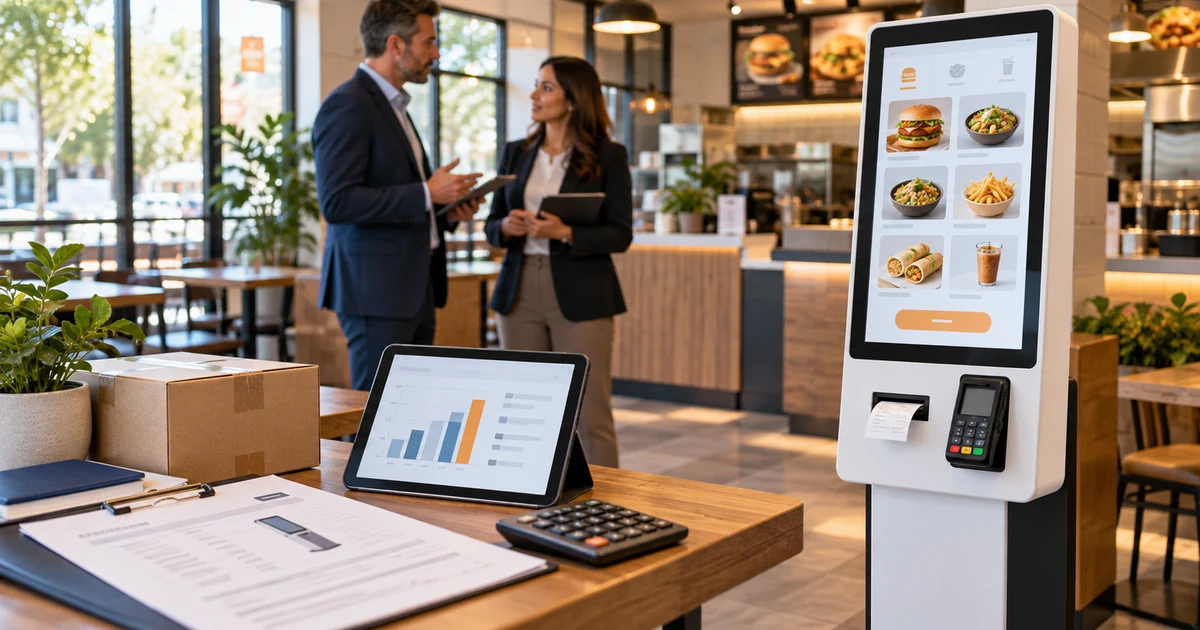
A commercial self-ordering kiosk typically needs a planning budget of about $1,500 to $7,500 per unit for hardware, based on published restaurant-technology market estimates. A tablet-based setup may start below this range, while a customized floor-standing kiosk with integrated payment, printing, scanning, branding, and installation can cost more.
The hardware price is only one part of the budget. Software subscriptions, POS and kitchen-system integration, payment processing, freight, duties, installation, maintenance, and spare units can materially increase the first-year and lifetime cost.
Published prices illustrate why buyers should compare complete systems rather than headline figures. In October 2026, Square listed its iPad-based Kiosk hardware at $149, but the compatible iPad, primary POS hardware, floor stand, software plan, and transaction fees were separate. Its kiosk software was listed at $30 or $50 per active device per month, depending on the restaurant plan. At the other end of the market, restaurant-industry guides from Rezku and Lavu placed complete self-ordering kiosk hardware broadly in the $1,500 to $7,500 range. These offers do not include the same components, so they should be treated as planning references rather than equivalent quotations.
Self-Ordering Kiosk Cost at a Glance
| Kiosk approach | Useful budget interpretation | Usually included | Common exclusions |
|---|---|---|---|
| Tablet-based kiosk | Hardware may start in the hundreds before adding the tablet, mount, software, POS, payment equipment, and accessories | Tablet enclosure or stand, basic mounting hardware | Tablet, receipt printer, floor stand, primary POS, monthly software, processing fees |
| Commercial countertop or wall-mounted kiosk | Often falls within the published $1,500–$7,500 commercial hardware range | Touch display, computer, enclosure, basic connectivity | Software integration, payment terminal, installation, custom branding, freight |
| Commercial floor-standing kiosk | Usually requires a configuration-based quote within or above the broad commercial range | Larger enclosure, touch display, computer, internal wiring | Optional printer, scanner, payment device, anchoring, site work, logistics |
| Customized or multi-peripheral kiosk | Engineered quotation; can exceed conventional restaurant-kiosk ranges | Project-specific metalwork and selected integrated modules | Software development, certification, tooling, on-site deployment, long-term support |
| Multi-location rollout | Per-unit price plus central integration and deployment costs | Agreed production configuration | Pilot engineering, site surveys, staging, training, spares, regional freight and taxes |
The most useful number is not the advertised device price. It is the installed first-year cost per working kiosk and the three- to five-year total cost of ownership.
What Is Included in a Self-Ordering Kiosk Quote?
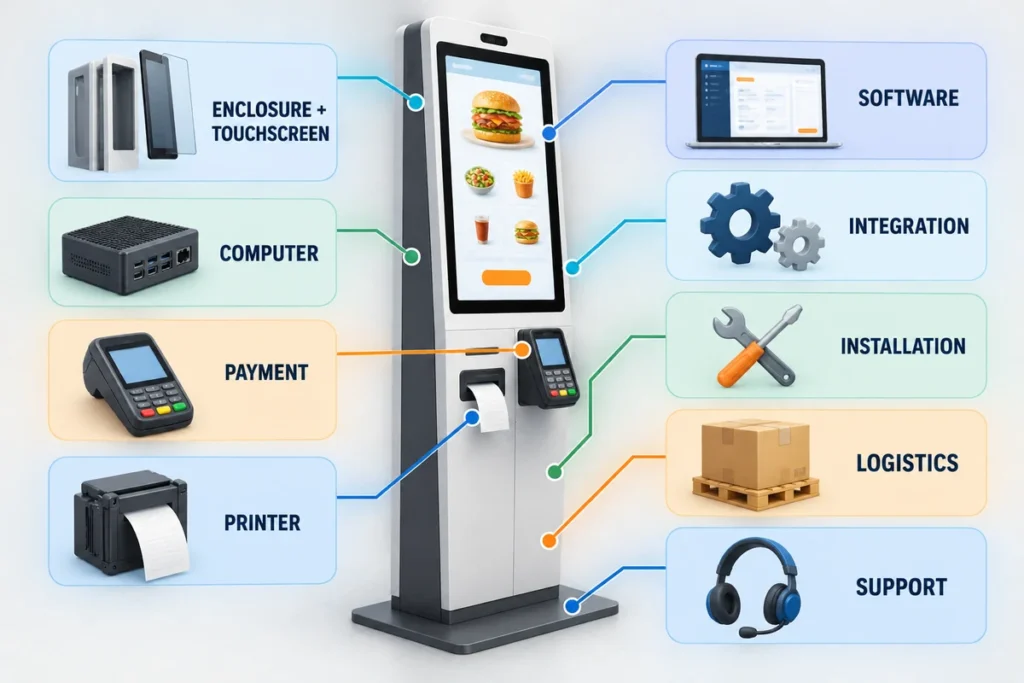
A complete ordering station may contain all of the following:
- Touchscreen and touch controller
- Embedded Android, Windows, or Linux computer
- Sheet-metal or molded enclosure
- Countertop, wall, or floor-standing mount
- Payment terminal or mounting provision
- Thermal receipt printer
- QR or barcode scanner
- NFC or loyalty-card reader
- Camera or customer-identification module
- Speakers, status lights, or accessibility devices
- Internal power distribution and network hardware
- Kiosk application and device-management software
- POS, kitchen display system, inventory, loyalty, and payment integration
- Installation, commissioning, training, and support
Two suppliers can quote products called a “self-ordering kiosk” while including completely different scopes. One may quote only the enclosure and touchscreen. Another may include the computer, printer, payment terminal, software license, and deployment service.
Ask every supplier to divide the quotation into hardware, software, integration, logistics, installation, and recurring fees. This makes offers comparable and exposes missing components before purchase.
The Seven Main Factors That Change Self-Ordering Kiosk Price
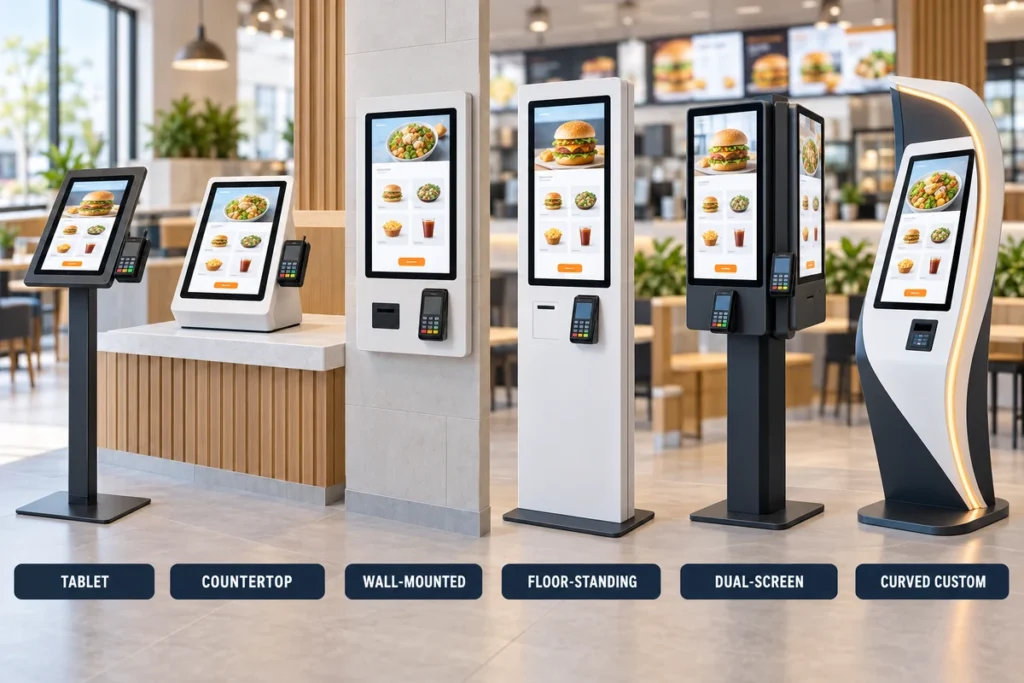
1. Kiosk Form Factor
The enclosure and installation method have a direct effect on material, fabrication, packaging, and site costs.
| Form factor | Cost tendency | Best fit | Cost questions to ask |
|---|---|---|---|
| Tablet stand | Lowest entry threshold | Small cafés, trials, and light-duty ordering | Is the tablet included? How is it secured, powered, and serviced? |
| Countertop kiosk | Lower structural cost | Existing counters with available space | Does the counter need reinforcement or cable access? |
| Wall-mounted kiosk | Saves floor space but needs site preparation | Pickup areas and compact restaurants | Are the bracket, wall reinforcement, power, and network work included? |
| Floor-standing kiosk | Higher enclosure and shipping cost | QSRs, food courts, and high-traffic locations | Does the quote include base anchoring, floor stand, and freight? |
| Dual-screen kiosk | Higher display, computer, and enclosure cost | Ordering plus advertising or guided workflows | Does each display need independent content control? |
| Curved or custom-shaped kiosk | Higher engineering and fabrication cost | Branded flagship locations and custom interiors | Are industrial design, tooling, samples, and finish approval included? |
Lucky-XFC’s self-ordering kiosk range includes countertop, wall-mounted, floor-standing, dual-screen, flat, and curved hardware starting points. The appropriate form should be selected from the restaurant layout and transaction workflow, not appearance alone.
2. Screen Size and Touch System
A larger display changes the panel, touch sensor, cover glass, enclosure, structural support, packaging, and freight requirements. A 15.6-inch countertop device and a 32-inch floor-standing kiosk are not simply different screen sizes; they are different physical systems.
Define:
- Screen size and orientation
- Resolution and brightness
- Projected-capacitive or other required touch technology
- Number of simultaneous touch points
- Cover-glass thickness and surface treatment
- Indoor, bright-window, or outdoor viewing conditions
- Expected operating hours
- Cleaning chemicals and impact exposure
For a custom build, request the finished product specification. The bare LCD specification does not describe the optical performance after touch glass, bonding, printed borders, and protective layers are added.
3. Computer and Operating System
The computing platform depends on the ordering application and peripheral workload. A browser-based menu may run on modest hardware, while rich media, computer vision, local analytics, or several connected devices may require a stronger processor, more memory, and more storage.
Confirm the required operating system, processor class, RAM, storage, network interfaces, remote-management method, security-update responsibility, and application recovery behavior. Do not buy the computer before the software provider confirms its supported hardware and operating-system versions.
4. Payment and Peripheral Hardware
Every added device affects the purchase price, internal space, wiring, power supply, thermal design, software integration, maintenance access, and certification scope.
Typical options include:
- EMV payment terminal or PIN pad
- Contactless or NFC reader
- Thermal receipt printer
- QR or barcode scanner
- Loyalty-card reader
- Camera
- Cash acceptor and change dispenser
- Router or backup connectivity
- Speakers and microphone
A payment-terminal opening or bracket is not the same as an integrated payment solution. Confirm who supplies the terminal, who owns payment certification, how the device communicates with the kiosk application, and whether the terminal model is approved for the deployment country.
Receipt printers also create ongoing costs for paper, cleaning, cutter wear, jams, and service access. If digital receipts are acceptable, removing the printer may simplify the enclosure and maintenance plan.
5. Software and System Integration
Software is often the largest recurring cost and the most common source of scope gaps. The kiosk must usually communicate with the POS, kitchen display system, menu database, payment gateway, loyalty platform, inventory system, and order-status workflow.
Check whether the price includes:
- Kiosk application license per device or per location
- Base restaurant or POS subscription
- Menu synchronization
- Modifiers, bundles, taxes, discounts, and daypart pricing
- Kitchen routing and printer or KDS output
- Loyalty, gift card, and customer-account functions
- Payment gateway and transaction fees
- Remote monitoring and device management
- Software updates and security patches
- API access, middleware, and custom integration work
- Testing, training, and launch support
Square’s public pricing is a useful illustration. Its low hardware price does not represent a complete deployment because the compatible iPad, primary POS, restaurant plan, kiosk app, and payment fees are separate. At the listed October 2026 software rates, the kiosk app alone equals $360 or $600 per active device per year, before the base plan and transaction charges.
6. Customization, Prototyping, and Compliance
Standard colors and existing cutouts cost less than a new enclosure. Custom branding can include powder-coat color, printed glass, illuminated logos, enclosure graphics, revised device openings, internal brackets, cable routes, and maintenance doors.
New hardware integration may require mechanical drawings, industrial design, prototype fabrication, application testing, and revision cycles. Buyers should also define the electrical, radio, accessibility, payment, environmental, and market-entry requirements that apply in the destination country. The relevant evidence should be agreed for the exact final configuration, not assumed from a visually similar model.
7. Freight, Installation, and Support
Large floor-standing kiosks cost more to package and ship than tablet or countertop systems. International buyers should request the packed dimensions, gross weight, number of packages, pallet method, HS code, Incoterm, and loading plan before comparing landed costs.
Installation may require:
- Site survey and placement plan
- Power and network cabling
- Wall reinforcement or floor anchoring
- Counter modification
- Kiosk assembly and peripheral installation
- Software imaging and device enrollment
- POS and KDS testing
- Staff training
- Removal and disposal of old equipment
Support costs depend on the warranty scope, spare-part policy, remote diagnostics, local service availability, response target, and product revision control. A cheaper kiosk can be more expensive to operate if the printer, payment device, computer, or touchscreen cannot be replaced without dismantling the enclosure.
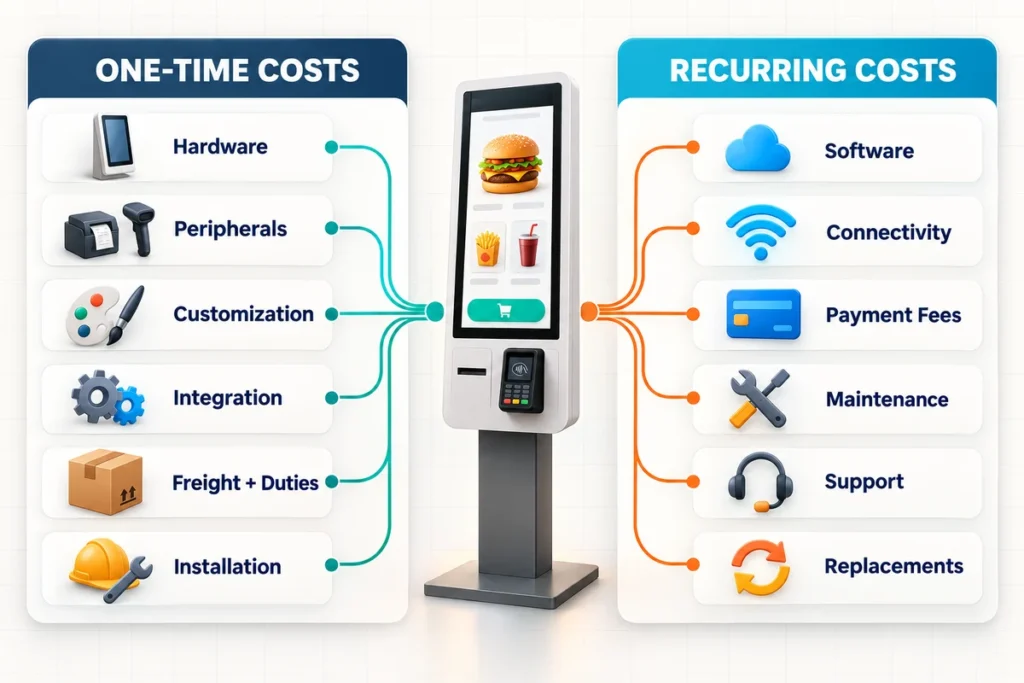
One-Time and Recurring Costs to Put in the Budget
| Cost item | One-time | Recurring | Often overlooked |
|---|---|---|---|
| Kiosk enclosure, display, and computer | Yes | No | Mount, cables, internal power distribution |
| Payment terminal | Sometimes | Sometimes | Merchant agreement, terminal rental, replacement policy |
| Printer, scanner, NFC, and camera | Yes | Supplies/service | Paper, cleaning, spare modules |
| Software license | Setup may apply | Usually | Base POS plan and per-device charges |
| POS/KDS/API integration | Yes | Support may apply | Middleware and future version changes |
| Branding and custom metalwork | Yes | No | Prototype and revision costs |
| Freight, duties, and taxes | Yes | No | Destination handling and inland delivery |
| Installation and commissioning | Yes | Multi-site support | Power, network, anchoring, and travel |
| Connectivity | Hardware may apply | Yes | Backup cellular service and data plan |
| Maintenance and spares | Initial stock | Yes | On-site labor and kiosk downtime |
| Payment processing | No | Per transaction | Fixed fee plus percentage, refunds, chargebacks |
How to Calculate the True Cost of Ownership
Use the same period and scope for every proposal. A practical three-year calculation is:
Three-year TCO = hardware + peripherals + customization + integration + freight + duties + installation + spare allocation + 36 months of software, connectivity, and support + payment-processing costs + expected maintenance
For a multi-location rollout, also include central project management, menu migration, device staging, training, site surveys, regional warehousing, field replacement, and the cost of holding spare units.
Calculate both:
- TCO per deployed kiosk, including shared project costs allocated across the installed quantity.
- TCO per location, including the number of kiosks, local installation, connectivity, and support.
This prevents a low per-unit factory price from hiding high integration or deployment costs.
How Many Kiosks Does a Restaurant Need?
Buying too few kiosks leaves queues in place. Buying too many creates unused hardware and unnecessary subscriptions.
Estimate the requirement from:
- Peak orders per 15 or 30 minutes
- Average customer ordering time
- Percentage of orders expected to use kiosks
- Required queue-time target
- Number of staffed counters retained
- Dine-in, takeaway, delivery, and pickup workflows
- Redundancy required if one kiosk is unavailable
- Space, power, network, and accessible-route constraints
Test the estimate during a pilot with the real menu. Complex modifiers, language selection, loyalty login, and payment steps can change transaction time. The restaurant may need fewer large kiosks, several compact units, or a mixed layout rather than one standard configuration.
How to Estimate Payback Without Assuming Guaranteed Savings
Kiosk ROI depends on the operating model, not the hardware alone. Measure benefits that the restaurant can actually verify.
Monthly net benefit = added gross profit from incremental orders + value of labor hours productively reassigned + value of reduced order errors − monthly software, connectivity, support, processing, and maintenance costs
Payback period in months = total upfront deployment cost ÷ monthly net benefit
Use gross profit rather than sales when calculating incremental order value. For labor, count only hours that can be removed, avoided, or reassigned to productive work. Do not treat every order placed at a kiosk as a full cashier-hour saving.
Track pilot results by time period and location:
- Orders per hour during peak periods
- Average order value and gross margin
- Queue and transaction time
- Kiosk adoption rate
- Voids, remakes, and ordering errors
- Labor hours by role
- Kiosk uptime and support incidents
- Software, processing, paper, and maintenance costs
A pilot should confirm operational value before a large rollout, especially when the project requires a new software integration or unfamiliar payment workflow.
How to Compare Self-Ordering Kiosk Quotations
Use one requirement document and ask each supplier to mark every line as included, optional, customer-supplied, or excluded.
| Comparison area | Evidence to request |
|---|---|
| Product scope | Bill of materials and clear list of included hardware |
| Display and touch | Finished-system datasheet, touch technology, brightness, resolution |
| Computer | CPU, RAM, storage, operating system, ports, image and update method |
| Peripherals | Exact models, mounting, drivers, cables, supplies, service access |
| Payment | Terminal ownership, country approval, processor, integration responsibility |
| Mechanical design | Dimensioned drawing, mounting method, access panels, ventilation |
| Software | License basis, required base plan, integrations, API fees, updates |
| Customization | Drawings, finish sample, logo method, prototype and tooling charges |
| Compliance | Documents applicable to the final model and destination market |
| Logistics | Incoterm, packing dimensions, gross weight, pallet and insurance |
| Deployment | Installation scope, site requirements, training, acceptance test |
| Support | Warranty terms, exclusions, spare parts, response process, software support |
| Commercial terms | Quantity breaks, payment terms, quote validity, revision control |
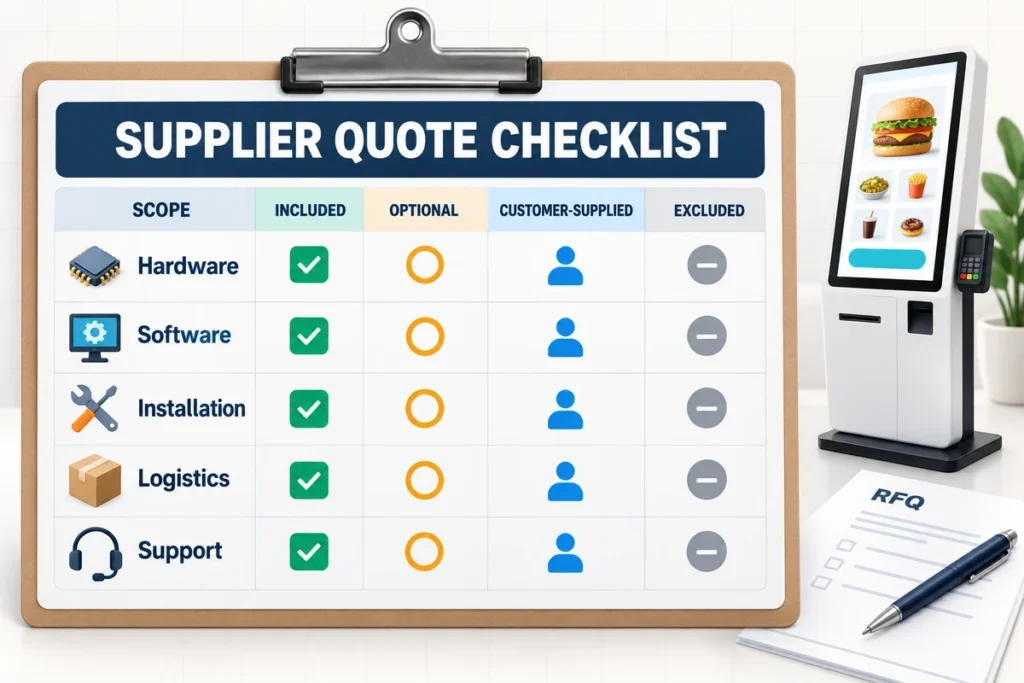
Questions to Include in Your RFQ
Send the following information to receive a useful quotation:
- Restaurant type and customer ordering workflow
- Deployment country and installation locations
- Pilot quantity and expected rollout quantity
- Countertop, wall-mounted, or floor-standing format
- Preferred screen size and orientation
- Indoor lighting and operating schedule
- Menu application and supported operating system
- Existing POS, KDS, payment, loyalty, and inventory systems
- Required printer, scanner, NFC, camera, and payment devices
- Cashless or cash-acceptance requirement
- Network method and offline-operation requirement
- Branding, color, logo, and enclosure requirements
- Accessibility and market-compliance requirements
- Installation responsibility and site conditions
- Required Incoterm and destination address
- Spare-unit, replacement-part, and support expectations
If the software already exists, provide its hardware requirements and peripheral list. If the software is still being selected, identify who will own the integration before freezing the kiosk hardware.
What Lucky-XFC Can Quote
Lucky-XFC supplies configurable self-service kiosk hardware for ordering and other commercial workflows. Available project starting points include countertop, wall-mounted, floor-standing, dual-screen, flat, and curved structures, with screen sizes ranging from compact 15.6-inch units to larger commercial displays.
Depending on the project, the hardware can be configured around Android, Windows IoT, or Linux computing platforms and can provide positions for thermal printers, QR or barcode scanners, NFC readers, cameras, POS terminals, PIN pads, and other selected peripherals. Final compatibility depends on the software, device models, payment system, target market, and approved engineering drawing.
Projects that need a display integrated into a separate cabinet can also start with a kiosk touch screen monitor rather than a complete terminal. This can reduce unnecessary enclosure work when the buyer or local integrator already owns the cabinet, computer, software, and field installation.
Get a Configuration-Based Self-Ordering Kiosk Quote
The realistic cost of a self-ordering kiosk is determined by the complete transaction workflow. A useful quote must define the enclosure, touchscreen, computer, operating system, payment method, printer and scanner requirements, software integration, installation, logistics, and support scope.
Send Lucky-XFC your kiosk format, screen size, software platform, peripheral list, quantity, destination, branding requirements, and installation plan. The team can review the hardware configuration and prepare a project-specific quotation instead of relying on a misleading generic unit price.
